Shared Buffer Management Usage
This feature manages the cross-process shared buffer and can be used together with Shared Queue Management. The scope of the shared buffer is determined by the authorization of the shared queue, involving one active process and multiple standby processes.
API Call Process
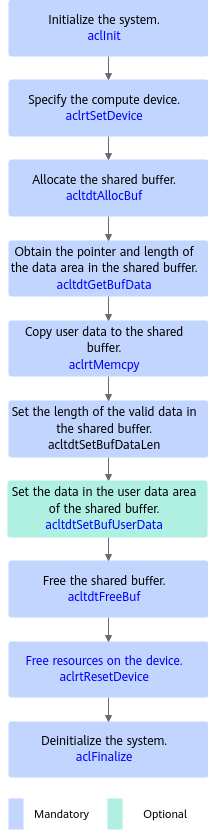
The preceding figure shows the sequence of calling key APIs, which is described as follows:
- Call aclInit to initialize the system.
- Call aclrtSetDevice to specify the compute device.
- Allocate the shared buffer.
Call acltdtAllocBuf to allocate the shared buffer. Select the buffer type as required.
- Fill the shared buffer with valid data.
Call acltdtGetBufData to obtain the pointer and length of the data area of the shared buffer. Then, call aclrtMemcpy to copy user data to the shared buffer. Lastly, call acltdtSetBufDataLen to set the valid data length so that acltdtGetBufDataLen can be called to obtain the valid data length in the cross-process scenario, based on which you can obtain the data in the shared buffer.
- Set the data in the user data area of the shared buffer.
Call acltdtSetBufUserData to set the data in the user data area of the shared buffer so that it can be obtained by calling acltdtGetBufUserData in the cross-process scenario.
- Free the shared buffer.
- Call aclrtResetDevice to reset the device and free the resources on the device.
- Call aclFinalize to deinitialize the system and free the resources used by the acl API in the process.
Sample Code
The following is a code snippet of key steps. It is for reference only and cannot be directly copied for compilation or running. After APIs are called, you need to add exception handling branches and record error logs and info logs.
1 2 3 4 5 6 7 8 9 10 11 12 13 14 15 16 17 18 19 20 21 22 23 24 25 26 27 28 29 30 31 32 33 34 35 36 37 38 39 40 41 |
#include "acl/acl.h" // 1. Perform initialization. // The two dots (..) indicate a path relative to the directory of the executable file. // For example, if the executable file is stored in the out directory, the two dots (..) point to the parent directory of the out directory. const char *aclConfigPath = "../src/acl.json"; aclError ret = aclInit(aclConfigPath); // 2. Allocate runtime resources and specify the compute device. deviceId = 0 is used as an example. ret = aclrtSetDevice(0); // 3. Allocate and manage mbuf. DVPP memory whose size is set to 1024U is used as an example. size_t size = 1024U; acltdtBuf buf; ret = acltdtAllocBuf(size, ACL_TDT_DVPP_MEM, &buf); // 4. Fill the shared buffer with valid data. // 4.1 Obtain the pointer and length of the data area of the shared buffer. void *dataPtr = nullptr; size_t dataSize = 0U; ret = acltdtGetBufData(buf, &dataPtr, &dataSize); // 4.2 Copy user data to the shared buffer. size_t len = 512U; // User data size void *ptr = new (std::nothrow) char_t[len]; // The user allocates its own memory. // The user processes the allocated data. //...... ret = aclrtMemcpy(dataPtr, size, ptr, len, ACL_MEMCPY_HOST_TO_DEVICE); // 5. Free the buffer. delete[] ptr; ptr = nullptr; delete[] newPtr; newPtr = nullptr; ret = acltdtFreeBuf(buf); // 6. Deallocate runtime resources. ret = aclrtResetDevice(0); // 7. Perform deinitialization. ret = aclFinalize(); |