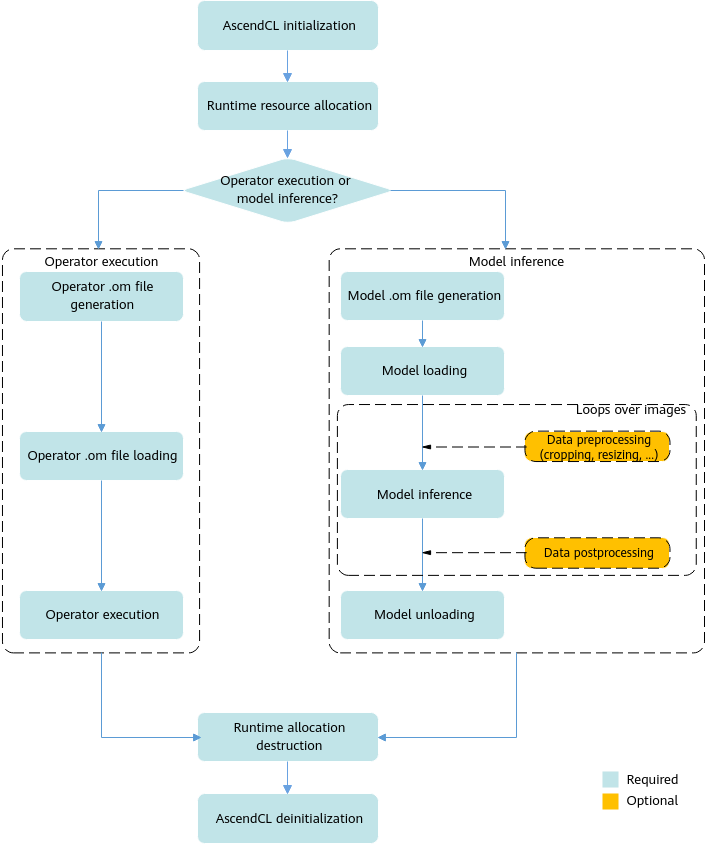
The figure briefs the API calls in typical scenarios. If the size of the input image does not meet the model requirements, media data processing is required. To implement model inference, the model needs to be loaded first. On the completion of model inference, the model needs to be unloaded. After model inference, the inference result needs to be postprocessed for displaying the class indexes corresponding to the top confidence values.
- Initialize AscendCL.
Call aclInit to initialize AscendCL.
- Allocate runtime resources.
Allocate devices, contexts, and streams in sequence.
For details, see API Call Sequence.
- Call an operator or run model inference.
- Call an operator.
For the API call sequence, see API Call Sequence.
- Use Ascend Tensor Compiler (ATC) to compile the operator definition file (.json file) into an offline model adapted to the Ascend AI Processor (.om file). For details, see ATC Instructions.
- Load the single-operator .om file.
- Run the operator and output the execution result.
- Run model inference.
- Generate an offline model adapted to the Ascend AI Processor (.om file), which is required in the model inference scenario. You need to build a model in advance. For details, see Building a Model.
- Load the model.
For the API call sequence, see API Call Sequence.
- (Optional) Process media data, including JPEG image and video decoding, image cropping, resizing, format conversion, and JPEG image encoding.
For the API call sequence, see Image/Video Data Processing.
- Run model inference to implement functions such as image classification and target recognition.
For the API call sequence, see Running a Model.
- (Optional) Postprocess the model inference result as required. For example, you can export the inference result to a file and look up in the inference result for the class indexes with top confidence values using single-operators.
- Call aclmdlUnload to unload your model.
- Call an operator.
- Destroy runtime allocations.
After all data is processed, destroy runtime allocations including the streams, contexts, and devices in sequence.
For the API call sequence, see API Call Sequence.
- Deinitialize AscendCL.
Call aclFinalize to deinitialize AscendCL.

Memory allocation and deallocation, data transfer via memory copy, and data type creation and destruction are the most frequent calls across the app development workflow, and therefore are not thoroughly illustrated in the flowchart. For details about memory allocation and deallocation, and memory copy APIs, see Memory Management. For details about data type creation and destruction APIs, see Data Types and Operations.