Term |
Description |
|---|---|
Synchronous/Asynchronous |
Indicates whether an API call returns immediately when the request is delivered.
|
Process/Thread |
Unless otherwise specified, the processes and threads mentioned in this document refer to those on the host. |
Host |
A host refers to the x86 or Arm server connected to the device. The host utilizes the NN compute capability provided by the device to implement services. |
Device |
A device refers to an Ascend AI Processor-powered hardware device that connects to the host over the PCIe interface, providing the host with the NN computing capability. Memory sharing between devices is not supported. |
Context |
A context is a container that manages the lifetime of its objects (including streams, events, and device memory). Each unique context has isolated streams and events, and they cannot be synchronized with one another. Contexts come in two types:
|
Stream |
Streams preserve the order of a stack of asynchronous operations being executed on the device. Stream-based kernel execution and data transfer can implement parallel computing on both the host and the device, as well as data transfer between the host and the device. Streams come in two types:
|
Event |
Events are used to synchronize tasks between streams by using AscendCL API calls, including tasks between the host and the device, and tasks on the same device. For example, to execute a task from stream 2 after executing a task from stream 1, create an event and append it to stream 1. |
AIPP |
The Artificial Intelligence Pre-Processing (AIPP) module is introduced for AI Core–based image preprocessing including Color Space Conversion (CSC), image normalization (by subtracting the mean value or multiplying a factor), image cropping (by specifying the crop start and cropping the image to the size required by the NN), and much more.
AIPP supports static and dynamic modes. However, these two modes are mutually exclusive.
|
Dynamic batch/image size |
The batch size or image size is not fixed in certain scenarios. For example, as the number of detected objects is subject to change in the object detection+target recognition cascade scenario, the batch size of the target recognition input is dynamic.
|
Dynamic dimensions (ND format only) |
Dynamic dimensions for the ND format are useful in scenarios where input dimensions are unknown (such as the Transformer network). ND indicates any format with up to four dimensions. |
Channel |
An RGB image has three channels: red, green, and blue. HSV stands for hue, saturation, and value (brightness) and is an alternative representation of the RGB color model. |
Standard form |
The device functions as an endpoint (EP) and cooperates with the host (namely, an x86 or Arm server) over the PCIe interface. In this case, CPU resources on the device are available only to the host, and inference apps run on the host. The device only provides the NN compute capability for the server. |
EP mode/RC mode |
The following uses the Ascend AI Processor as an example. If the PCIe works as the master and supports peripherals, this mode is referred to as the RC mode (or Ascend RC in the following). If the PCIe serves as a slave, this mode is referred to as the EP mode (or Ascend EP in the following). |
Device, Context, and Stream
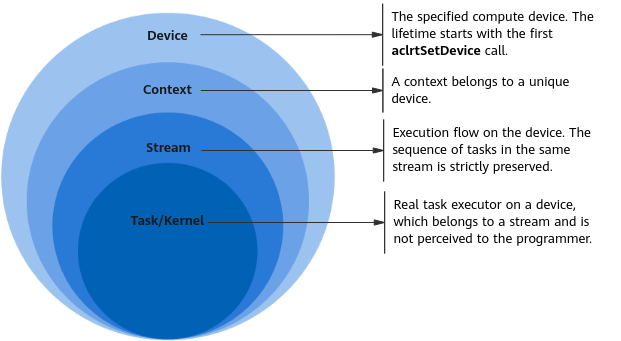
- A device specifies the compute device.
- Its lifetime starts with the first aclrtSetDevice call.
- With each aclrtSetDevice call, the reference count is increased by 1. With each aclrtResetDevice call, the reference count is decreased by 1.
- When the reference count is 0, resources on the device in the process is no longer available.
- A context belongs to a unique device.
- Contexts can be created implicitly or explicitly.
- The lifetime of an implicitly created context (default context) starts with the aclrtSetDevice call and ends with the aclrtResetDevice call when the reference count is 0. An implicitly created context is created only once. Calling aclrtSetDevice repeatedly to specify the same device adds only the reference count of the implicitly created context.
- The lifetime of an explicitly created context starts with the aclrtCreateContext call and ends with the aclrtDestroyContext call.
- If multiple contexts are created in a process, the current thread can use only one context at a time. It is recommended that aclrtSetCurrentContext be used to specify the context of the current thread to improve program maintainability. (The number of contexts depends on the number of streams. For details, see aclrtCreateStream.)
- Contexts in a process can be switched by calling aclrtSetCurrentContext.
- A stream is the execution flow on a device. The sequence of tasks in the same stream is strictly preserved.
- Streams can be created implicitly or explicitly.
- Each context has a default stream (implicitly created), the lifetime of which is the same as that of the corresponding context.
- The lifetime of an explicitly created stream starts with the aclrtCreateStream call and ends with the aclrtDestroyStream call. Once the context to which the explicitly created stream belongs is destroyed or the lifetime ends, the stream is no longer available.
- A task/kernel is the real task executor on a device.
Thread, Context, and Stream
- A context must be bound to a user thread, and the usage and scheduling of all device resources must be context-based.
- Only one context associated with the device is used in a thread at a time.
- aclrtSetCurrentContext can be called to quickly switch between devices. The following code snippet shows key steps only, and is not ready to be built or run.
...
aclrtCreateContext(&ctx1,0);
aclrtCreateStream(&s1);
aclopExecuteV2(op1,...,s1);
aclrtCreateContext(&ctx2,1);

/* After ctx2 is created, the context used in the current thread changes to ctx2, and the subsequent tasks are computed on device 1. This sample executes op2 on device 1. */
aclrtCreateStream(&s2);
aclopExecuteV2(op2,...,s2);
aclrtSetCurrentContext(ctx1);

/* Switch between devices by switching between contexts in the current thread so that the subsequent tasks can be computed on device 0.*/
aclopExecuteV2(op3,...,s1);
...
- Multiple streams can be created in a thread, where tasks in different streams can be implemented in parallel. In multithreading scenarios, you are advised to create one stream in each thread, where each stream is independent on the device and tasks in each stream are executed in the original order.
- Multi-thread scheduling depends on the OS scheduling of the running app. Multistreaming scheduling is performed by the scheduling component on the device.
Context Migration Between Threads in a Process
- Multiple contexts can be created in a process, but only one context can be used at a time in a thread.
- If multiple contexts are created in a thread, the most recently created context is used by default.
- If multiple contexts are created in a process, call aclrtSetCurrentContext to set the context to be used.
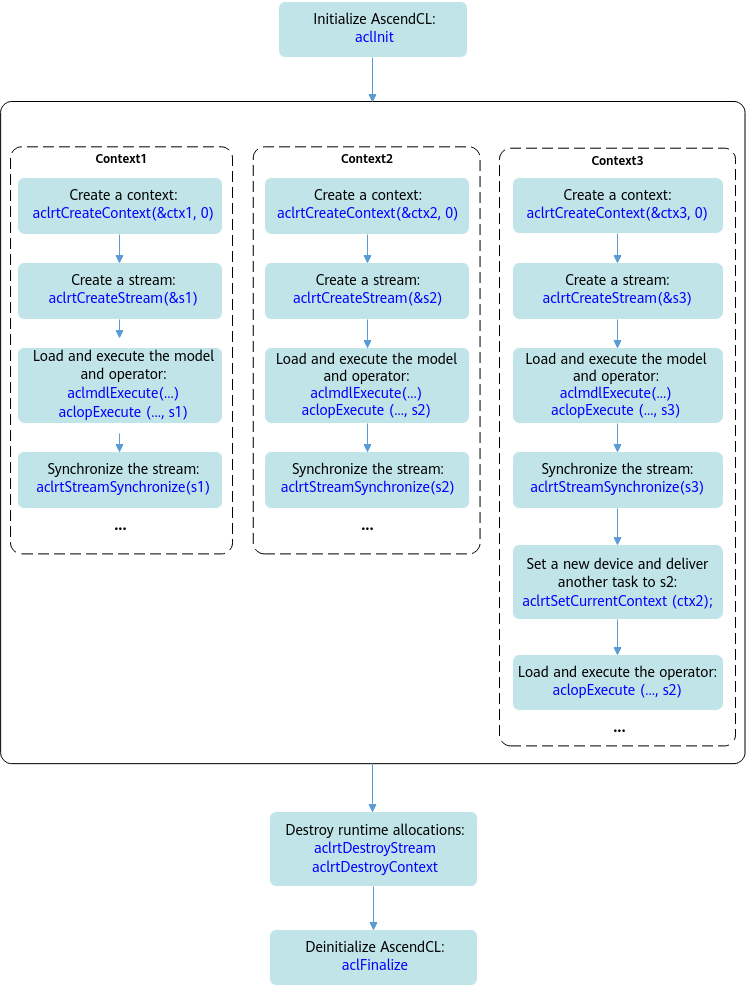
Use Cases of Default Context and Default Stream
- A context and a stream must exist before any requests are delivered to the device, and these can be created either explicitly or implicitly (default). The implicitly created context and stream are the default context and stream.
To pass the default stream to any API call, pass NULL directly.
- If an implicitly created context is used, aclrtGetCurrentContext, aclrtSetCurrentContext, and aclrtDestroyContext are not available.
- An implicitly created context or stream is applicable to simple apps where only one compute device is needed. For multi-thread apps, you are advised to use the explicitly created contexts and streams.
The following code snippet shows key steps only, and is not ready to be built or run.
...
aclInit(...);
aclrtSetDevice(0);

/* In the default context, a default stream is created, and the stream is available in the current thread. */
...
aclopExecuteV2(op1,...,NULL);  //NULL indicates that op1 is executed in the default stream.
aclopExecuteV2(op2,...,NULL); //NULL indicates that op2 is executed in the default stream.
aclrtSynchronizeStream(NULL);

/* Output the result as required when all computing tasks (op1 and op2 execution tasks) are complete. */
...
aclrtResetDevice(0); //Reset device 0. The lifetime of the corresponding default context and default stream end.
Multithreading and Multistreaming Performance
- Thread scheduling depends on the OS. Tasks added to streams are scheduled by Task Scheduler on the device. However, tasks in different streams within a process often contend for device resources, leading to lower performance than in certain single-stream scenarios.
- Various execution components are provided by Ascend AI Processor, such as AI Core, AI CPU, and Vector Core, so that different tasks can be executed by specialized components. You are advised to create streams based on the operator execution components.
- Performance depends on the app's logic implementation. Generally, the performance of a single-threading, multistreaming scenario is slightly better than that of a multithreading, multistreaming scenario, as less thread scheduling is involved at the app layer.