If network-wide model inference is involved, ensure that your app contains the code logic for model loading. For details about the API call sequence, see API Call Sequence. This section describes the API call sequence for loading a model. For details about loading and executing a single-operator, see Single-Operator Execution.
AscendCL provides two sets of model loading APIs for you to choose from based on your programming habits and application scenarios.
- Figure 1: You only need to set parameters for different loading modes in the model loading API (such as loading from a file or from the memory). This has a wider application scope, but multiple APIs need to be used together to create configuration objects, set attribute values in objects, and load models, respectively.
- Figure 2: You need to select different APIs according to different loading modes (such as loading from a file or from the memory). The operation is relatively simple, but you need to remember the loading APIs of various modes.
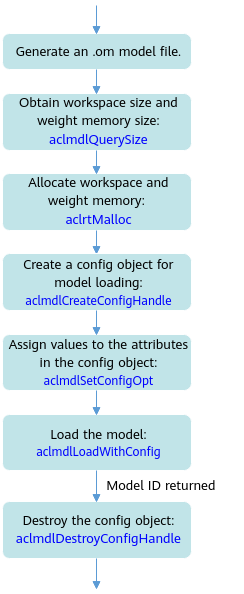
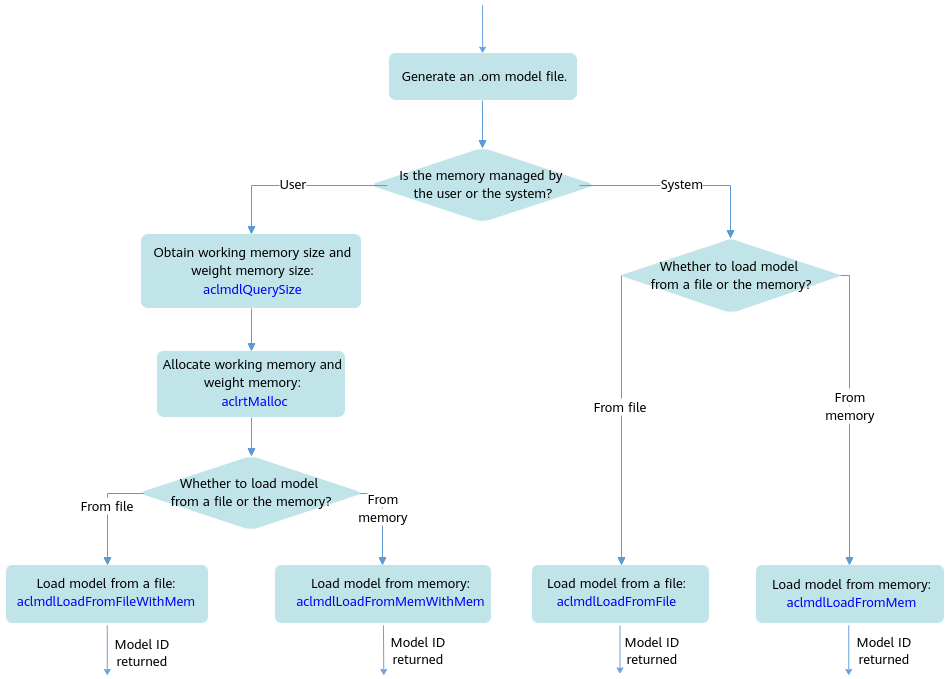
The key APIs are described as follows:
- Before loading a model, build an offline model adapted to the Ascend AI Processor (.om file). For details, see Building a Model.
- If the memory is managed by the user, use aclmdlQuerySize to query the sizes of the workspace and weight memory required for model execution to avoid memory waste.
If the shape of the input data is uncertain, you cannot call aclmdlQuerySize to query the memory size. As a result, you cannot manage the memory during model loading. Therefore, you need to call aclmdlLoadFromFile or aclmdlLoadFromMem to allow the system to manage the memory.
- Model data can be loaded using the following APIs. A model ID is returned after the model is successfully loaded.
- The caller can determine whether to load the model from a file or from memory and whether the memory is managed by the system or the user by choosing from the following APIs:
- aclmdlLoadFromFile: loads offline model data from a file. The memory is managed by the system.
- aclmdlLoadFromMem: loads offline model data from memory. The memory is managed by the system.
- aclmdlLoadFromFileWithMem: loads offline model data from a file. The memory (including the workspace for storing temporary data at model runtime and weight memory for storing the weight data of the model) is managed by the user.
- aclmdlLoadFromMemWithMem: loads offline model data from memory. The memory (including workspace and weight memory) is managed by the user.
- aclmdlSetConfigOpt and aclmdlLoadWithConfig, however, are more complicated. The caller needs to set the attributes in the configuration object passed to the API call to decide how the model will be loaded and who will manage the memory.
- The caller can determine whether to load the model from a file or from memory and whether the memory is managed by the system or the user by choosing from the following APIs: