If single-operator execution is involved, your app must contain the related code logic. For details about the API call sequence, see API Call Sequence and then this section.
For details about the operators supported by the system, see Operator Lists.
For operators that are not supported by the system, you need to develop custom operators by referring to Operator Developer Guide.

For TIK custom dynamic-shape operators, you need to register an operator selector first. For details, see Executing a Dynamic-Shape Operator (Operator Selector Registered).
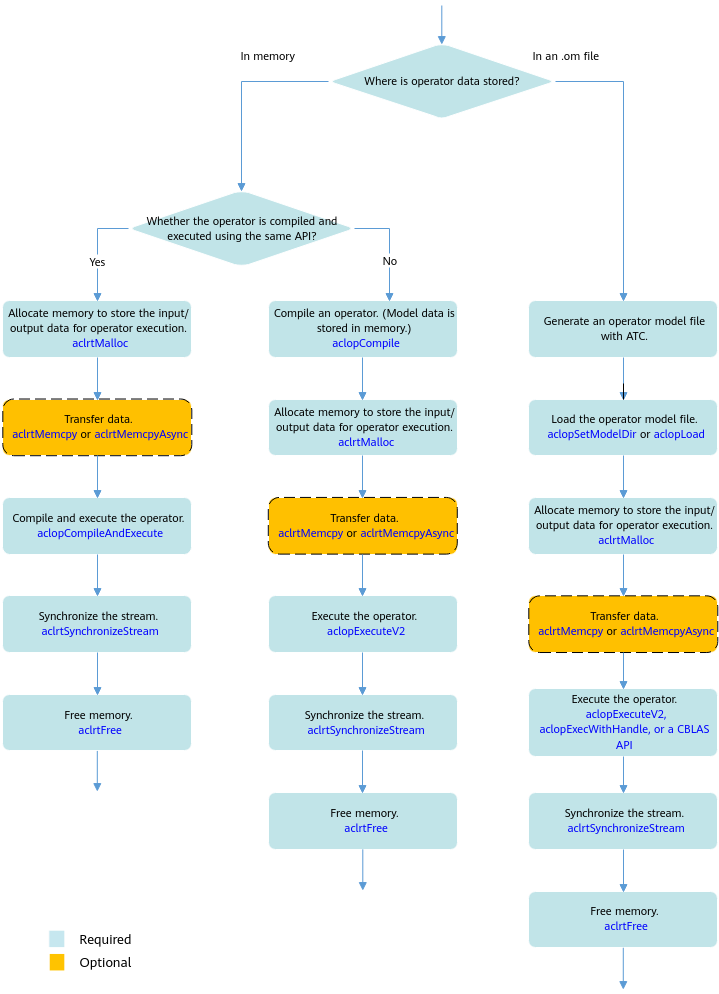
- Compile an operator.
Operators can be compiled in either of the following modes:
- After an operator is compiled, the operator data is saved in the .om file.
In this mode, you need to use the ATC tool to compile the operator. For details, see ATC Instructions. Compile the single-operator definition file (.json) into an offline model adapted to the Ascend AI Processor (.om file).
After the compilation, perform 2, 3, 5, 6, and 7 in sequence.
- After an operator is compiled, the operator data is saved in memory.
In this mode, you need to call AscendCL APIs as required.
- For the operators that will be executed for multiple times, you are advised to call aclopCompile to compile the operators. After the compilation, perform 3, 5, 6, and 7 in sequence.
- For the operators that will be compiled and executed for the same number of times, you are advised to perform 3 and then call aclopCompileAndExecute. After the compilation, perform 6 and 7 in sequence.
- After an operator is compiled, the operator data is saved in the .om file.
- Load the operator model file.
You can use either of the following methods:
- Call aclopSetModelDir to set the directory of the single-operator .om model file.
- Call aclopLoad to load the single-operator model data from memory. The memory is managed by the user. The "single-operator model data" refers to the data that is loaded to the memory from the single-operator .om file.
- Call aclrtMalloc to allocate device memory to store the input and output data of the operator.
To transfer data from the host to the device, call aclrtMemcpy (synchronous mode) or aclrtMemcpyAsync (asynchronous mode) to copy the memory.
- In the dynamic-shape scenario, if the output shape of an operator cannot be determined, you need to infer or estimate the output shape of the operator before executing the operator.
You need to call the aclopInferShape, aclGetTensorDescNumDims, aclGetTensorDescDimV2, and aclGetTensorDescDimRange APIs to infer or estimate the output shape of the operator as the input of the operator execution API aclopExecuteV2.
- Execute the operator.
- Operators encapsulated as AscendCL APIs (for details, see CBLAS APIs), including the GEMM operator and Cast operator, can be executed in either of the following ways:
- Non-handle mode: Call APIs whose names do not contain keyword "Handle", for example, aclblasGemmEx (with the GEMM operator encapsulated) and aclopCast (with the Cast operator encapsulated).
- Handle mode: Call APIs whose names contain keyword "Handle", for example, aclblasCreateHandleForGemmEx and aclopCreateHandleForCast. Also call aclopExecWithHandle to execute the operators.
- Operators that are not encapsulated as AscendCL APIs, can be executed in either of the following ways:
- Non-handle mode: Call aclopExecuteV2.
- Handle mode: Call aclopCreateHandle to create a handle, and then call aclopExecWithHandle.
If an operator is executed in non-handle mode, the system matches the model in the memory based on the operator description in every execution.
If an operator is executed in handle mode, the system matches the model in the memory based on the operator description, and caches it in the handle. The handle mode boosts the efficiency in scenarios where the same operator is executed for multiples times. Call aclopDestroyHandle to destroy the handle when it is no longer needed.
- Operators encapsulated as AscendCL APIs (for details, see CBLAS APIs), including the GEMM operator and Cast operator, can be executed in either of the following ways:
- Call aclrtSynchronizeStream to wait for the stream tasks to complete.
- Call aclrtFree to free the memory.
Call aclrtMemcpy (synchronous mode) or aclrtMemcpyAsync (asynchronous mode) to transfer data from the device to the host via memory copy.