If network-wide model inference is involved, ensure that your app contains the code logic for model execution. For details about the API call sequence, see API Call Sequence.
This section describes the API call sequence for executing a model. For details about loading and executing a single-operator, see Single-Operator Execution.
Model Execution
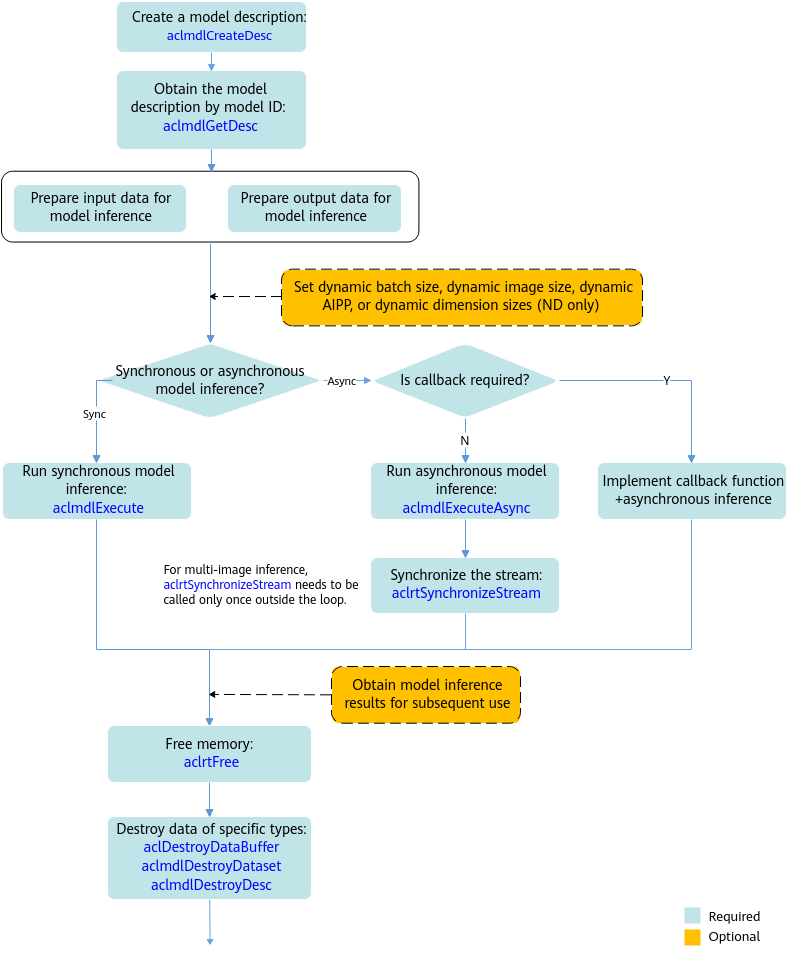
The key APIs are described as follows:
- Call aclmdlCreateDesc to create data for describing the model.
- Call aclmdlGetDesc to obtain the model description using the model ID returned in API Call Sequence.
- Prepare the input and output data structures for model execution. For details, see Preparing Input/Output Data Structure for Model Execution.
To configure dynamic batch size, dynamic image size, dynamic AIPP, or dynamic dimensions (ND format only) for your model input, see Model Inference with Dynamic-Shape Inputs and Dynamic AIPP Model Inference.
- Run model inference.
In static batch size (greater than 1) scenarios, the input data is fed to your model for inference only when the input data reaches the given batch size. Design the processing logic for the remainder data that is less than the batch size as needed.
Currently, synchronous model inference and asynchronous model inference are supported.
- To run synchronous model execution, use aclmdlExecute.
- To run asynchronous model execution, use aclmdlExecuteAsync.
Also call aclrtSynchronizeStream to wait for the stream tasks to complete.
For details about asynchronous inference, see Asynchronous Model Inference.
- Obtain the results of model inference for subsequent use.
For synchronous inference, obtain the output data of model inference directly.
For asynchronous inference with callback, obtain the model inference result from the callback function for subsequent use.
- Free the memory.
Call aclrtFree to free the device memory.
- Destroy data of specific types.
After the model inference is complete, call aclDestroyDataBuffer and aclmdlDestroyDataset in sequence to destroy the input data of the model. If the model takes multiple inputs or outputs, a separate call to aclDestroyDataBuffer is needed for each input or output.
Preparing Input/Output Data Structure for Model Execution
AscendCL provides the following data types to describe a model, model inputs, model outputs, and data buffers, as the input parameters of the model execution call.
- Use data of the aclmdlDesc type to describe the basic information of your model (such as the input/output count, and the name, data type, format, and shape of each input/output).
After a model is successfully loaded, call aclmdlGetDesc to obtain the model description based on the model ID. Then, you can obtain the input/output count, and memory size, shape, format, and data type of each input/output from the model description by using the operation APIs under aclmdlDesc.
- Use data of the aclmdlDataset type to describe the input/output data of your model. Note that a model might have more than one input and more than one output.
Call the operation APIs under aclmdlDataset to add aclDataBuffers and obtain the number of aclDataBuffers.
- Use data of the aclDataBuffer type to describe the buffer address and buffer size of each input/output.
Call the operation APIs of under aclDataBuffer type to obtain the buffer address and buffer size of each input/output.
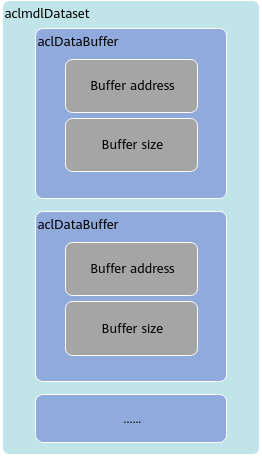
After learning related data types, you can use the operation APIs for these data types to prepare the input and output data structures of the model, as shown in the following figure.
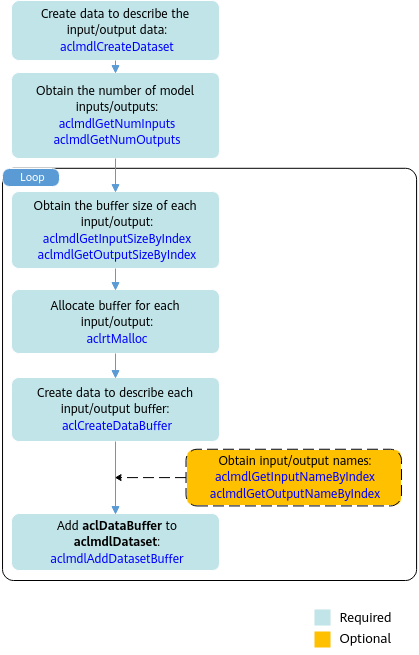
The key points are described as follows:
- When a model has multiple inputs and outputs, you can call aclmdlGetNumInputs and aclmdlGetNumOutputs to obtain the actual numbers of inputs and outputs.
- You can call aclmdlGetInputSizeByIndex or aclmdlGetOutputSizeByIndex to obtain the buffer size required by each model input or output.
If the model allows dynamic batch size, dynamic image size, or dynamic dimensions (ND format only), the input tensor supports a range of shape profiles and is not determined until the model is executed, you are advised to use the aclmdlGetInputSizeByIndex call to obtain the required buffer size, which is the buffer size required by the maximum profile to ensure buffer sufficiency.
- When a model has multiple inputs or outputs, to ensure that aclDataBuffers are added to aclmdlDataset in order, you are advised to call aclmdlGetInputNameByIndex or aclmdlGetOutputNameByIndex to obtain the input or output names, so that you can add each aclDataBuffer to aclmdlDataset based on the corresponding input or output index.