If image cropping and resizing are involved during app development, ensure that your app contains the code logic for such image processing. For details about the API call sequence, see API Call Sequence. For details about the VPC functions, see Function Description.
Figure 1 Cropping and resizing
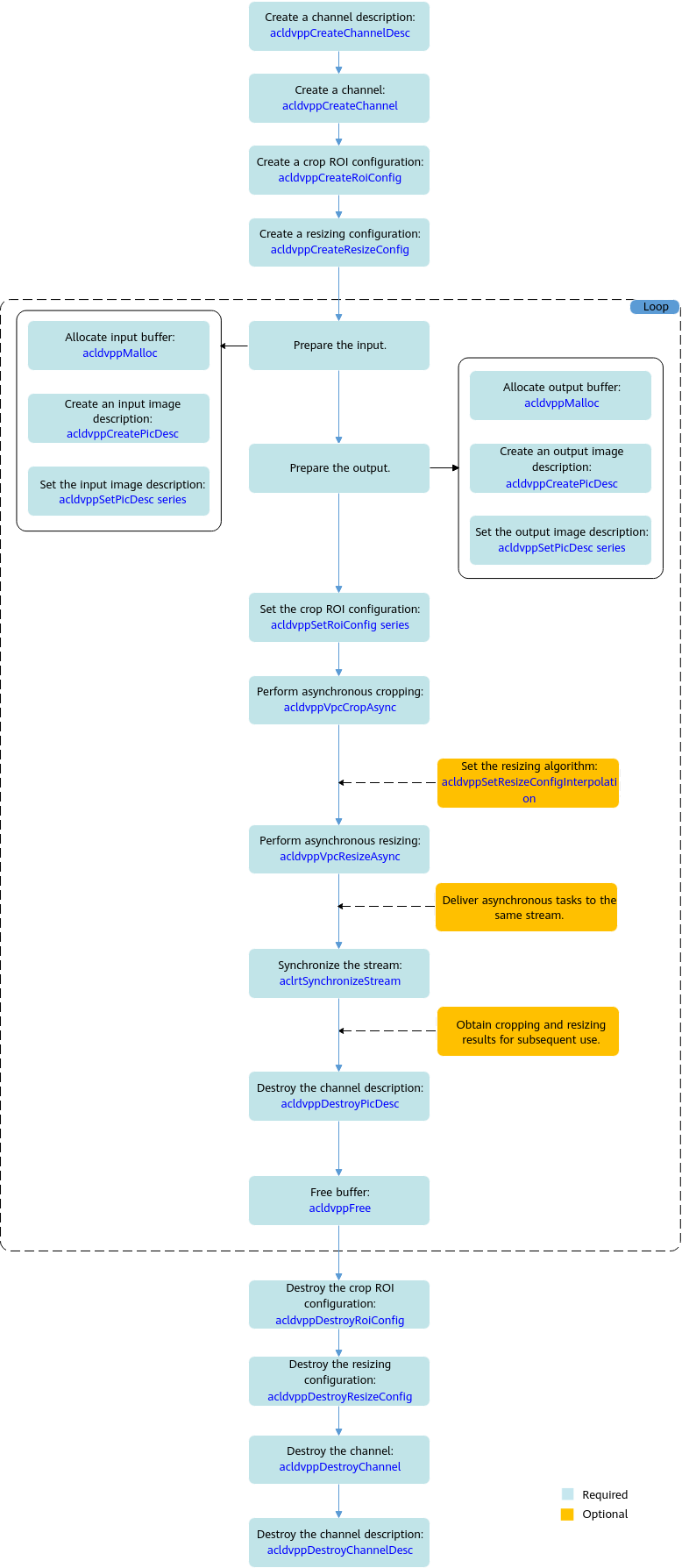
The key APIs are described as follows (taking cropping and resizing as an example):
- Call acldvppCreateChannel to create an image processing channel.
Before creating a channel, call acldvppCreateChannelDesc to create a channel description.
- Call acldvppCreateRoiConfig and acldvppCreateResizeConfig to create a crop ROI configuration and a resizing configuration, respectively.
- Before cropping and resizing, call acldvppMalloc to allocate the device buffer for storing the input or output data.
- Perform cropping and resizing.
- About cropping:
- Call the acldvppVpcCropAsync asynchronous API to crop a selected ROI from the input image and load the crop ROI to the output buffer as an output image.
The cropped image will be resized again if cropArea is different from that of the output image.
- Call the acldvppVpcCropAndPasteAsync asynchronous API to crop a selected ROI from the input image and paste the crop ROI on the destination image as an output image.
- The cropped image will be resized again if the size of the cropArea is inconsistent with that of the pasteArea.
- To paste the pasteArea on a canvas loaded to the output buffer, modify the code logic as follows: Allocate the output buffer and then load a canvas to the allocated buffer.
- Call the acldvppVpcCropAsync asynchronous API to crop a selected ROI from the input image and load the crop ROI to the output buffer as an output image.
- About resizing:
- Call the acldvppVpcResizeAsync asynchronous API to resize the input image to the expected size of the output image.
- Calculate the buffer for storing the resized image based on the YUV420SP format as follows: widthStride x heightStride x 3/2
- Also call aclrtSynchronizeStream to wait for the stream tasks to complete.
- About cropping:
- Call acldvppFree to free the input and output buffers.
- Call acldvppDestroyRoiConfig and acldvppDestroyResizeConfig to destroy the crop ROI configuration and resizing configuration, respectively.
- Call acldvppDestroyChannel to destroy the image processing channel.
After destroying the channel, call acldvppDestroyChannelDesc to destroy the channel description.