Description
Sets surround-view stitching parameters, including distortion correction and gain compensation parameters.
The Ascend 310 AI Processor does not support this API in the current version.
The Ascend 910 AI Processor does not support this API in the current version.
The Ascend 310P AI Processor does not support this API in the current version.
Restrictions
The width and height of the input and output images must be correctly configured. The resolutions range from [10, 6] to [4096, 4096].
Prototype
hi_s32 hi_mpi_vpc_set_roundview_stitching_param(hi_vpc_chn chn, const hi_roundview_stitching_param *stitch_param)
Parameters
Parameter |
Input/Output |
Description |
|---|---|---|
chn |
Input |
Image processing channel ID, whose value range is [0, 256). The maximum number of channels is 256. |
stitch_param |
Input |
Surround-view stitching parameters, including distortion correction and gain compensation parameters. |
Returns
- 0: success
- Other values: failure
API Call Sequence
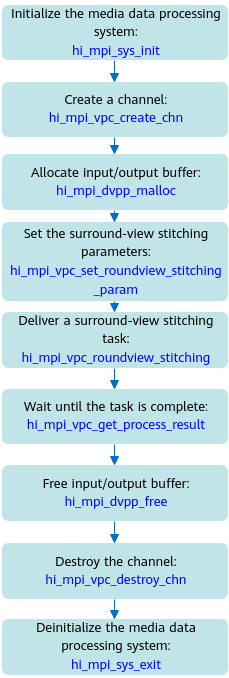
The key APIs are described as follows:
- Call hi_mpi_sys_init to initialize the media data processing system.
- Call hi_mpi_vpc_create_chn to create a channel.
- Call hi_mpi_dvpp_malloc to allocate device memory to store the input or output data.
- Call hi_mpi_vpc_set_roundview_stitching_param to set distortion correction and gain compensation parameters.
After a channel is created, hi_mpi_vpc_set_roundview_stitching_param can be called only once to set parameters.
- Call hi_mpi_vpc_roundview_stitching to deliver a surround-view stitching task.
hi_mpi_vpc_roundview_stitching is an asynchronous API. The API call only delivers a task. You also need to call hi_mpi_vpc_get_process_result to obtain the processing result.
- Call hi_mpi_dvpp_free to free the input and output buffers.
- Call hi_mpi_vpc_destroy_chn to destroy the channel and release surround-view stitching resources.
- Call hi_mpi_sys_exit to deinitialize the media data processing system.
After a channel is created, the distortion correction table, fusion coefficient, gain compensation, and their callback functions are configured by calling hi_mpi_vpc_set_roundview_stitching_param. After the configuration is complete, call hi_mpi_vpc_roundview_stitching to set image parameters and deliver a task. Similar to other VPC APIs, hi_mpi_vpc_get_process_result is used to obtain the result. Once the parameters are configured, hi_mpi_vpc_roundview_stitching and hi_mpi_vpc_get_process_result can be called repeatedly. You can call hi_mpi_vpc_get_roundview_stitching_param to obtain the previously configured parameters.