The model inference workflow in the dynamic shape input scenario is similar to that in the scenario described in Developing a Basic Inference App. Both workflows include AscendCL initialization and deinitialization, runtime resource allocation and deallocation, model building, model loading, model execution, and model unloading.
This section focuses on the differences between the two scenarios.
- During model building: You need to set the dynamic batch size, dynamic image size, and dynamic dimensions (ND format).
After model building, the inputs of dynamic batch size, dynamic image size, and dynamic dimensions are added to the generated OM model. During model inference, the input values are provided.
Assume that the batch size of input a is dynamic. In the generated OM model, input b is added to describe the batch size of input a. For details about how to prepare the data structure of input a for model execution, see Preparing Input/Output Data Structure for Model Execution. For details about how to prepare the data structure of input b and set the data of input b, see the following description.
- Before model inference
- Prepare the data structures of the inputs of dynamic batch size, dynamic image size, and dynamic dimensions.
- Before allocating memory for the inputs of dynamic batch size, dynamic image size, and dynamic dimensions, call aclmdlGetInputIndexByName to obtain the index of the input in the model based on the input name (the input name is fixed to ACL_DYNAMIC_TENSOR_NAME).
 ACL_DYNAMIC_TENSOR_NAME is a macro defined as follows:
#define ACL_DYNAMIC_TENSOR_NAME "ascend_mbatch_shape_data"
- Pass the input index to the aclmdlGetInputSizeByIndex call to obtain the input buffer size.
- Pass the size obtained in 2 to the aclrtMalloc call to allocate buffer.
Do not initialize the buffer manually; otherwise, the service will be unavailable. After the API calls described in 2, the system automatically initializes the buffer.
- Call aclCreateDataBuffer to create data of the aclDataBuffer type to store the buffer address and buffer size of the inputs of dynamic batch size, image size, and dimensions.
- Call aclmdlCreateDataset to create data of type aclmdlDataset, and call aclmdlAddDatasetBuffer to add data of type aclDataBuffer to data of type aclmdlDataset.
- Before allocating memory for the inputs of dynamic batch size, dynamic image size, and dynamic dimensions, call aclmdlGetInputIndexByName to obtain the index of the input in the model based on the input name (the input name is fixed to ACL_DYNAMIC_TENSOR_NAME).
- Set the dynamic batch size, dynamic image size, and dynamic dimensions.
Figure 1 API Call Sequence
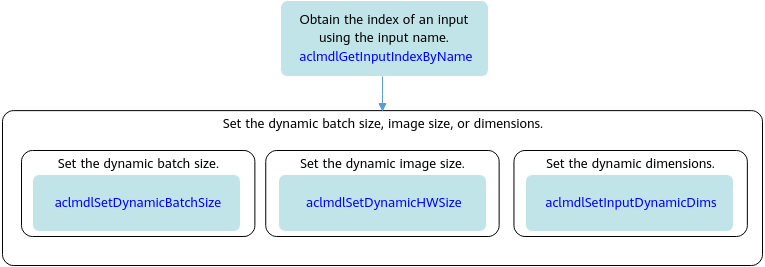
- Call aclmdlGetInputIndexByName to obtain the index of the runtime shape or dynamic AIPP input using the input name (fixed at ACL_DYNAMIC_TENSOR_NAME).
- Set the dynamic batch size, dynamic image size, and dynamic dimensions.
- Call aclmdlSetDynamicBatchSize to set the runtime batch size.
The configured batch size must be among the batch size profiles set during model building.
aclmdlGetDynamicBatch can be called to obtain the batch size profiles supported by the model.
- Call aclmdlSetDynamicHWSize to set the runtime image size.
The configured image size must be among the image size profiles set during model building.
You can also call the aclmdlGetDynamicHW API to obtain the image size profiles supported by the model.
- Call aclmdlSetInputDynamicDims to set the runtime dimensions.
The configured dimensions must be among the dimension profiles set during model building.
You can also call aclmdlGetInputDynamicDims to obtain the dimension profiles supported by the model.
- Call aclmdlSetDynamicBatchSize to set the runtime batch size.
- Prepare the data structures of the inputs of dynamic batch size, dynamic image size, and dynamic dimensions.

- For a single model, the aclmdlSetDynamicBatchSize, aclmdlSetDynamicHWSize, and aclmdlSetInputDynamicDims API calls are mutually exclusive.
- For the same model, AIPP (static or dynamic) and dynamic dimensions (ND format only) are mutually exclusive.