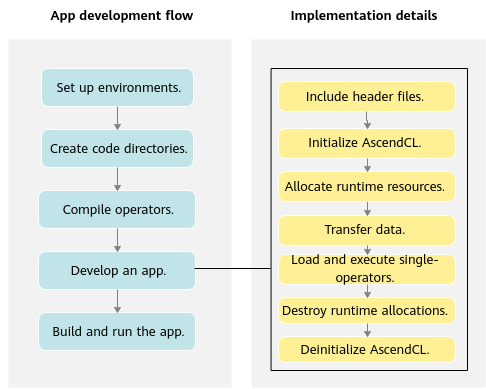
- Set up the environment.
For details, see Development and Operating Environment Setup.
- Create code directories.
Before developing an app, you must create directories to store the code files, build scripts, test images, and model files.
The following is an example:
├App name
├── op_model              // Operator description files for compilation
│   ├── xxx.json

├── data
│   ├── xxxxxx           // Test data

├── inc                     // Header files that declare functions
│   ├── xxx.h

├── out                   // Output files

├── src
│   ├── xxx.json         // Configuration files for system initialization
│   ├── CMakeLists.txt   // Build script
│   ├── xxx.cpp          // Implementation files
- Compile an operator.
You can compile operators in either of the following ways (see API Call Sequence):
- Generate operator .om files with ATC.
Construct single-operator description files in .json format (describing the inputs, outputs, and attributes of the operators), use ATC to compile the single-operator description files into .om files, and call the AscendCL APIs to load the .om files and execute the operators.
For details about how to use ATC, see ATC Instructions.
- Call the AscendCL API to compile operators.
Call the AscendCL APIs directly to compile and execute the operators.
- Generate operator .om files with ATC.
- Develop an app.
For details about the required header files and library files, see Dependent Header Files and Library Files.
For details about the single-operator call sequence, see API Call Sequence and related sample code.
- Build and run the app. For details, see App Build and Run.