
For the Ascend 310 AI Processor, this function is not supported in the current version.
For the Ascend 910 AI Processor, this function is not supported in the current version.
If video encoding is involved during app development, ensure that your app contains the code logic for such video encoding. For details about the API call sequence, see API Call Sequence. For details about the VENC functions, see VENC Functions and Restrictions.
Figure 1 API Call Sequence
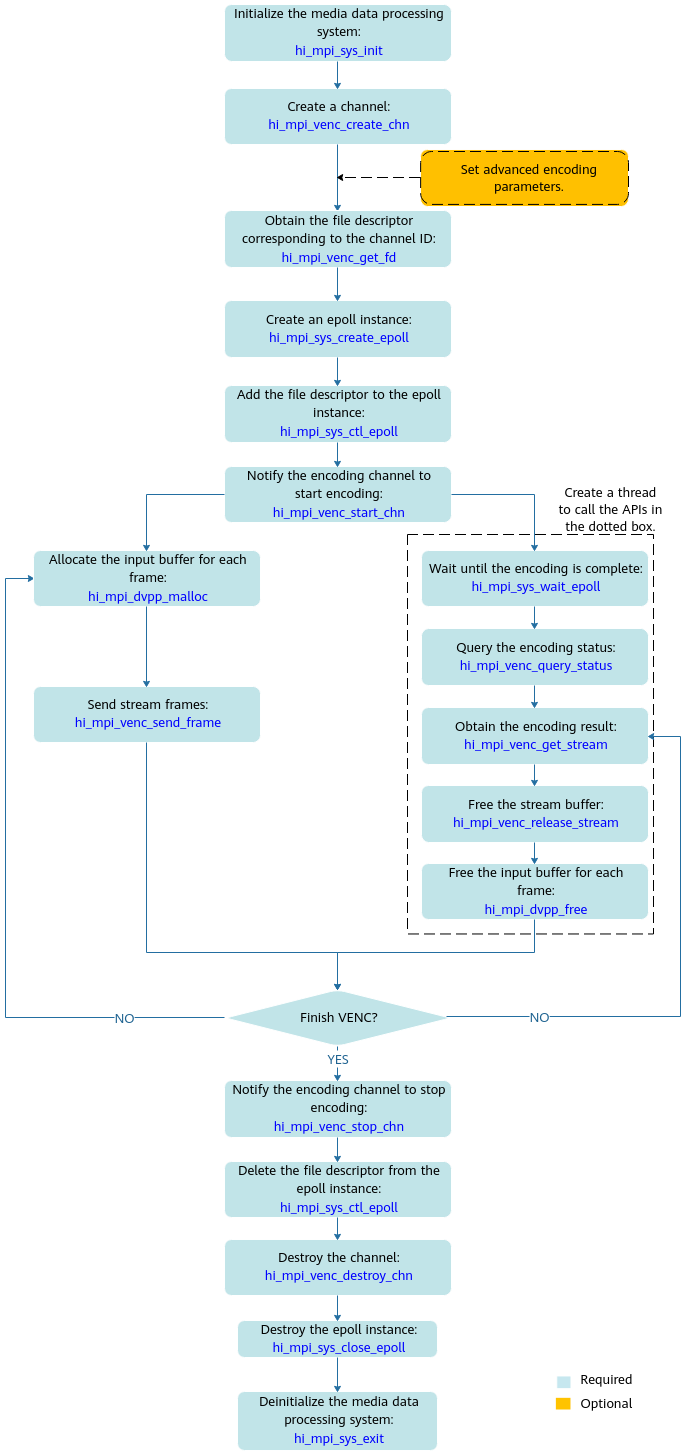
The current system supports encoding H.264 and H.265 video streams. The key APIs are described as follows:
- Call hi_mpi_sys_init to initialize the media data processing system.
- Call hi_mpi_venc_create_chn to create a channel.
After creating a channel, you can set advanced encoding parameters such as the scene mode and stream controller as required. For details, see hi_mpi_venc_set_jpeg_param to hi_mpi_venc_compact_jpeg_tables.
- Call hi_mpi_venc_get_fd to obtain the file descriptor corresponding to the channel ID.
- Call hi_mpi_sys_create_epoll to create a DVPP epoll instance.
- Call hi_mpi_sys_ctl_epoll to add the file descriptor corresponding to the encoding channel to the epoll instance.
Skip this step if the select or poll function is used.
- Call hi_mpi_venc_start_chn to notify the channel to start encoding.
- Call hi_mpi_dvpp_malloc to allocate device buffers for storing the input data.
- Start a user-mode thread and call hi_mpi_sys_wait_epoll to wait for the epoll instance to complete encoding.
- Call hi_mpi_venc_send_frame to feed your stream to the encoder.
- Once the encoding is complete, the hi_mpi_sys_wait_epoll, select, or poll function returns a value. Call hi_mpi_venc_query_status to query the encoding status and call hi_mpi_venc_get_stream to obtain the encoding result.
- Call hi_mpi_venc_release_stream to free the buffer in time when the encoding result is no longer needed. Otherwise, no more encoding task can be performed because the encoding buffer is used up.
- Call hi_mpi_dvpp_free to free the input buffer.
- When the source images have been completely fed, call hi_mpi_venc_stop_chn to stop the channel from receiving new images.
- Call hi_mpi_sys_ctl_epoll to delete the encoding channel file descriptor from the epoll instance.
- After all encoding tasks are complete, call hi_mpi_venc_destroy_chn to destroy the encoding channel and free the buffer.
- Call hi_mpi_sys_close_epoll to destroy the DVPP epoll instance.
- Call hi_mpi_sys_exit to deinitialize the media data processing system.