
For the Ascend 310 AI Processor, this function is not supported in the current version.
For the Ascend 910 AI Processor, this function is not supported in the current version.
If image cropping and resizing are involved during app development, ensure that your app contains the code logic for such image processing. For details about the API call sequence, see API Call Sequence. For details about the VPC functions, see Restrictions.
If DVPP APIs are called on the host, the image processing result will be stored in the device buffer. To access this result, transfer the result data to the host.
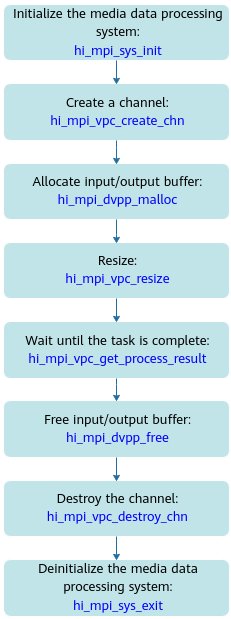
The current system supports image cropping and resizing. The key APIs are described as follows:
- Call hi_mpi_sys_init to initialize the media data processing system.
- Call hi_mpi_vpc_create_chn to create a channel.
- Call hi_mpi_dvpp_malloc to allocate the device buffer to store the input or output data.
- Perform image cropping and resizing. Resizing is used as an example. For details about other functions (such as format conversion and pyramid), see the API description in VPC.
Resize the image by the hi_mpi_vpc_resize call. hi_mpi_vpc_resize is an asynchronous API. The API call only delivers a task. You also need to call hi_mpi_vpc_get_process_result to obtain the processing result.
You can call hi_mpi_vpc_get_process_result in the same thread as hi_mpi_vpc_resize, or start a new thread. Multiple threads can improve efficiency, but require inter-thread synchronization.
To reformat the input image during cropping and resizing, you can set different formats for the input and output images.
- Call hi_mpi_dvpp_free to free the input and output buffers.
- Call hi_mpi_vpc_destroy_chn to destroy the channel.
- Call hi_mpi_sys_exit to deinitialize the media data processing system.