If video decoding is involved during app development, ensure that your app contains the code logic for such video decoding. For details about the API call sequence, see API Call Sequence. For details about the VDEC functions, see Functions and Restrictions.
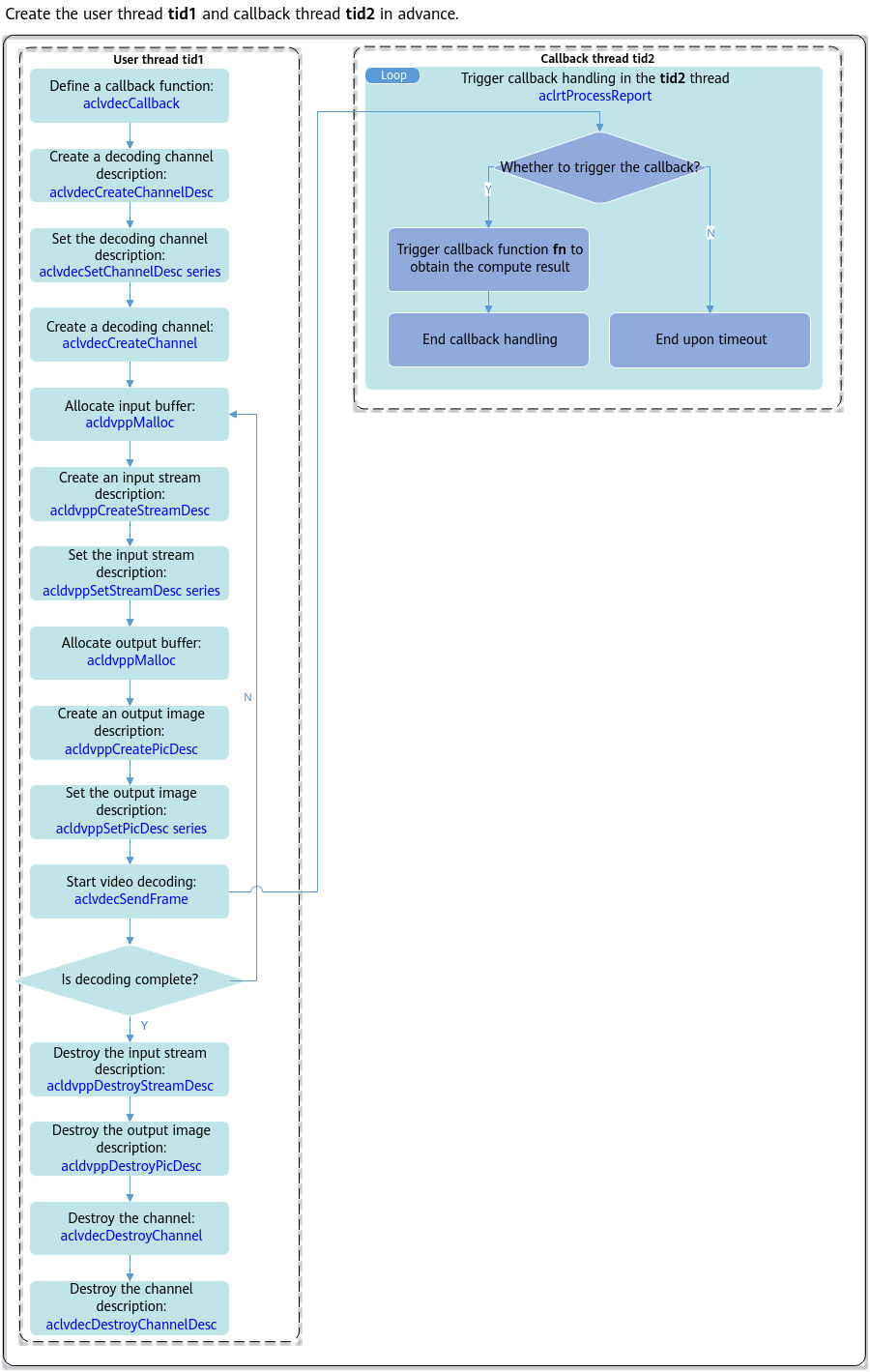
This module implements video decoding. The key APIs are described as follows:
- Call aclvdecCreateChannel to create a video decoding channel.
- Perform the following steps before creating a video decoding channel.
- Call aclvdecCreateChannelDesc to create a channel description.
- Call aclvdecSetChannelDesc series to set the decoding channel description, including the channel ID, thread, callback function, and video coding protocol.
- The callback function needs to be created by the user in advance. It is used to obtain the decoding output and destroy allocations in a timely manner. For details about the callback function prototype, see aclvdecCallback.
Call acldvppGetPicDescRetCode in the callback function to obtain the return code retCode. The value 0 indicates the success of decoding, while 1 indicates failure. If the decoding fails, locate the fault based on the return code in the log. For details, see Return Codes.
After the decoding is complete, free the input and output buffers and destroy the stream description and image description in the callback function in a timely manner.
- The user needs to create a thread and define a thread function in advance. Once aclrtProcessReport is called in the thread function, the created callback function in 1.b.i will be triggered after a specified period of time.

If aclvdecSetChannelDescOutPicFormat is not called to set the output format, images in YUV420SP (NV12) are output by default.
- The callback function needs to be created by the user in advance. It is used to obtain the decoding output and destroy allocations in a timely manner. For details about the callback function prototype, see aclvdecCallback.
- The following APIs are encapsulated in aclvdecCreateChannel and do not need to be called separately:
- aclrtCreateStream: explicitly creates a stream. It is internally used by VDEC.
- aclrtSubscribeReport: subscribes to a thread for handling the callback function in a stream. The callback function and thread are specified by the calls to the aclvdecSetChannelDesc series.
- Perform the following steps before creating a video decoding channel.
- Call aclvdecSendFrame to decode the video stream into YUV420SP images.
- Perform the following steps before decoding a video stream:
- Call acldvppCreateStreamDesc to create an input video stream description, and call acldvppSetStreamDesc series to set the description, including the buffer address, buffer size, and stream format.
- Call acldvppCreatePicDesc to create an output image description, and call acldvppSetPicDesc series to set the description, including the buffer address, buffer size, and image format.
- aclrtLaunchCallback is encapsulated in aclvdecSendFrame to insert a callback function that needs to be executed to the stream. aclrtLaunchCallback does not need to be called separately.
- To obtain the frame sequence number returned after decoding, define the userData parameter of aclvdecSendFrame. Then, the sequence number can be passed to the VDEC callback function to determine the frame to be processed.
- Perform the following steps before decoding a video stream:
- Call aclvdecDestroyChannel to destroy the channel.
- The channel is destroyed only after the transmitted frames are decoded and the callback function is processed.
- The following APIs are encapsulated in aclvdecDestroyChannel and do not need to be called separately:
- aclrtUnSubscribeReport: unsubscribes from a thread, so that the callback function in the stream is no longer handled by the specified thread.
- aclrtDestroyStream: destroys a stream.
- After destroying the channel, call aclvdecDestroyChannelDesc to destroy the channel description.
- After destroying the channel description, destroy the thread created in 1.b.ii.