If a YUV image needs to be encoded into a JPEG image during app development, ensure that your app contains the code logic for such image encoding. For details about the API call sequence, see API Call Sequence. For details about the JPEGE functions, see Functions and Restrictions.
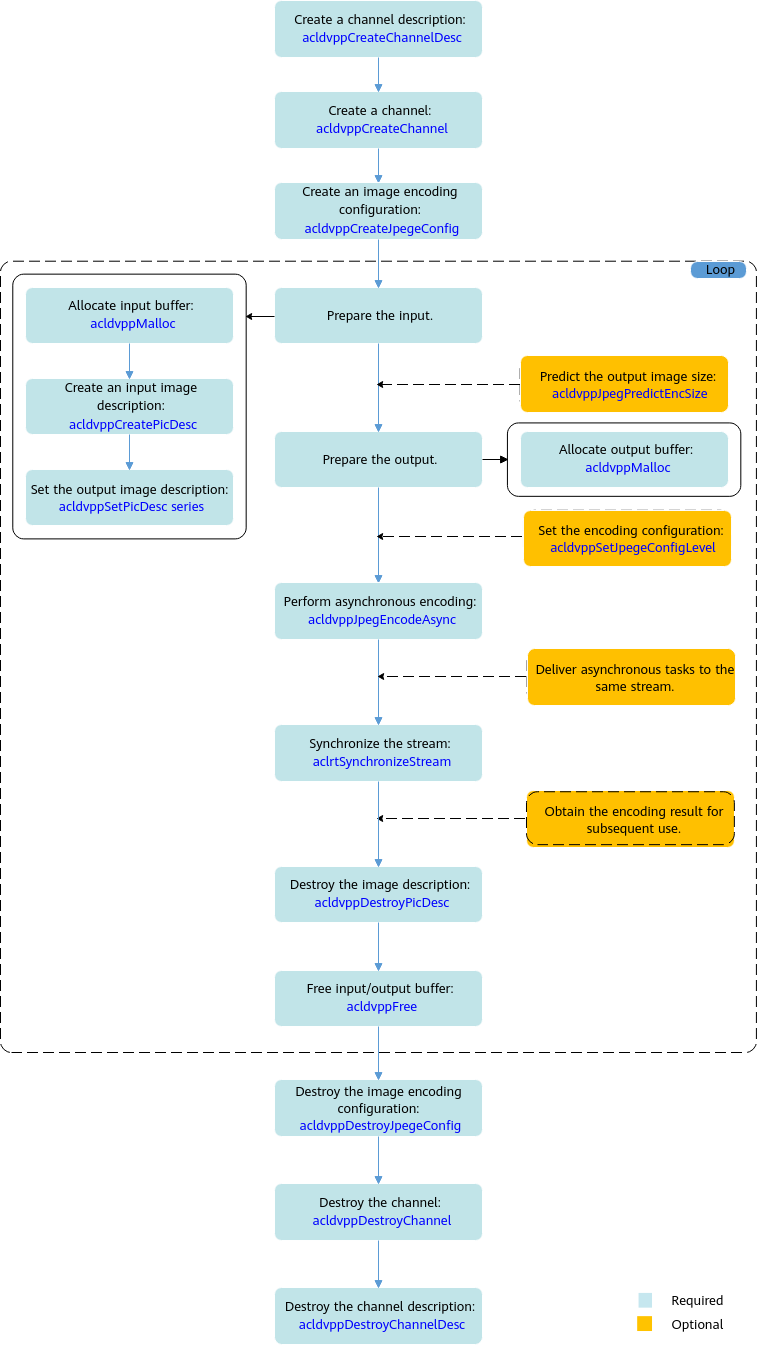
The current system supports YUV to JPG image encoding. The key APIs are described as follows:
- Call acldvppCreateChannel to create an image processing channel.
Before creating a channel, call acldvppCreateChannelDesc to create a channel description.
- Call acldvppCreateJpegeConfig to create an image encoding configuration.
- Before JPEG encoding, call acldvppMalloc to allocate the device buffer for storing the input or output data.
Before allocating output buffer, call acldvppJpegPredictEncSize to predict the required output allocation size based on the input image description and the image encoding configuration.
- Call acldvppJpegEncodeAsync to run asynchronous encoding.
Also call aclrtSynchronizeStream to wait for the stream tasks to complete.
- Call acldvppDestroyJpegeConfig to destroy the image encoding configuration data.
- After the encoding is complete, call acldvppFree to free the input and output buffers in a timely manner.
- Call acldvppDestroyChannel to destroy the image processing channel.
After destroying the channel, call acldvppDestroyChannelDesc to destroy the channel description.