简介
您可以参考本章节进行算子适配插件的开发,将基于第三方框架的算子映射成适配昇腾AI处理器的算子,将算子信息注册到Graph Engine(简称:GE)中。基于ONNX框架的网络运行时,首先会加载并调用GE中的插件信息,将原始框架网络中的算子进行解析并映射成适配昇腾AI处理器中的算子。
下文我们将适配昇腾AI处理器的算子称为CANN算子。
原理介绍
算子插件的实现包含CANN算子类型的注册、原始框架中算子类型的注册以及原始框架中算子属性到CANN算子属性的映射,算子的映射通过Parser模块完成。插件在整网络运行场景下的实现流程如图1所示。
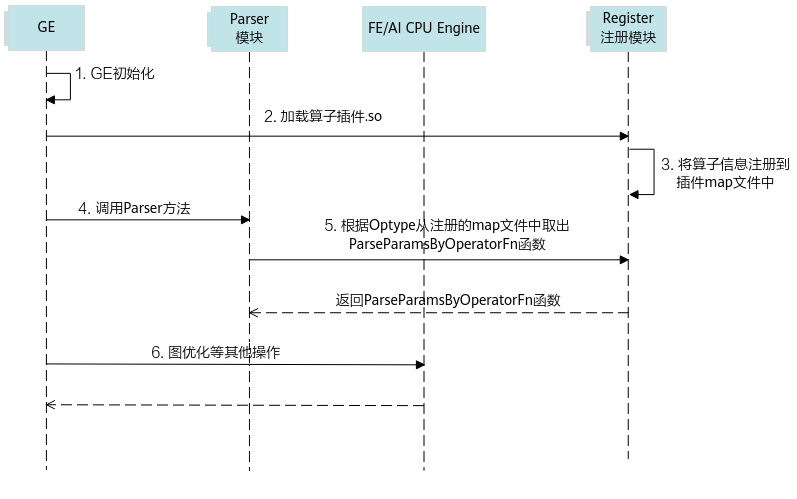
- 首先GE接收到第三方框架的原始网络模型,并进行初始化,网络模型的拓扑图我们简称为图。
- GE从Register注册模块中加载算子插件生成的.so文件,在CANN软件安装后文件存储路径的“opp/built-in/framework/”路径中。
- 读取算子插件.so中的算子相关信息,并将其注册到算子插件的map文件中(所有算子插件的相关信息都会以map的形式存储到一个文件中)。
- GE向Parser模块发送调用Parser方法的请求。
- Parser模块根据算子类型(OpType)从算子插件的map文件中取出对应的Parser函数,并返回实现函数ParseParamsByOperatorFn给Parser模块,Parser模块根据实现函数将第三方网络算子中的属性映射到CANN算子的属性,即算子原型中的属性定义,从而完成第三方网络中算子到CANN算子的映射。
- 后续会进行图准备、图拆分及图优化等一系列操作,最终生成适配昇腾AI处理器的网络模型。
插件实现
GE提供REGISTER_CUSTOM_OP宏,按照指定的算子名称完成算子的注册。
原始框架为ONNX的自定义算子注册代码:
#include "register/register.h"
#include "graph/operator.h"
#include "json.hpp"
namespace domi
{
REGISTER_CUSTOM_OP("OpType")
    .FrameworkType(ONNX)
    .OriginOpType("OriginOpType")
    .ParseParamsByOperatorFn(ParseParamByOpFunc)   //用来注册解析算子属性的函数
    .ImplyType(ImplyType::TVM);  // TBE算子:ImplyType::TVM;AI CPU算子:ImplyType::AI_CPU
}
- 在代码实现文件顶部使用预编译命令“#include”将插件实现函数相关的头文件包含到插件实现文件中。
- register.h存储在CANN软件安装后文件存储路径的“include/register/”目录下,包含该头文件,可使用算子注册相关类,调用算子注册相关的接口。
- operator.h(可选),存储在CANN软件安装后文件存储路径的“include/graph/”目录下,包含该头文件,可以使用Operator类相关接口,获取算子输入输出及属性等算子信息。
- json.hpp:用于进行ONNX数据定义的解析,将String类型的算子参数定义转换为json格式。
若样例工程中未提供“json.hpp”文件,用户可以自行下载,并将“json.hpp”放在工程可以找到的任意路径下,然后包含此头文件即可,下载路径可参见json.hpp。
- REGISTER_CUSTOM_OP:注册自定义算子,OpType作为注册到GE中的算子类型,可以任意命名但不能和已有的算子命名冲突,且需要与算子原型注册中的OpType保持一致。
- FrameworkType:ONNX代表原始框架为ONNX。
- OriginOpType:算子在原始框架中的类型。例如自定义算子OpTypeA,对应ONNX算子库版本opset_version=11,原始框架类型为“ai.onnx::11::OpTypeA”,当前支持的ONNX版本范围为9~15。
- ParseParamsByOperatorFn(ParseParamByOpFunc):用来注册解析算子属性的函数,需要用户自定义实现回调函数ParseParamByOpFunc。
回调函数ParseParamByOpFunc的声明如下所示:
Status ParseParamByOpFunc(const ge::Operator& op_src, ge::Operator& op_dest)
- ParseParamByOpFunc:函数名称,用户自定义,需要保持唯一。
- op_src:ONNX框架定义的Operator类对象,包含ONNX模型中自定义的算子属性信息,定义来源ONNX框架的原始模型文件。
- op_dest:CANN算子数据结构,保存算子信息,Operator类的详细描述请参见Operator类。
ONNX原始模型中,属性为repeated message类型,如下所示:
message NodeProto {
  repeated string input = 1;    // namespace Value
  repeated string output = 2;   // namespace Value
  string name = 3;     // namespace Node
  string op_type = 4;  // namespace Operator
  string domain = 7;   // namespace Domain

  // Additional named attributes.
  repeated AttributeProto attribute = 5;
}
GE对属性进行解析时,对于repeated message类型的参数,可使用GetAttr(const char *name, ge::AscendString &attr_value)接口获取其属性值,然后将AscendString类型的属性值转换为String类型,再将其转换为json格式进行属性字段的解析。
实现如下所示:
using namespace ge;
using json = nlohmann::json;
namespace domi {
namespace {
const int kTypeFloat = 1;
}
Status ParseOnnxParamsLeakyRelu(const ge::Operator& op_src, ge::Operator& op_dest) {
  // trans op_src to op_dest
  // if op_src get required attr failed, need to return Failed
  // if op_src get optional attr failed, need to return Failed or set a default value
  float negative_slope = 0.01f;
  string negative_slope_str;
  AscendString attrs_string;
  // 使用固定属性名称“attribute”获取ONNX算子中的属性,并赋值给AscendString类型对象
  if (ge::GRAPH_SUCCESS == op_src.GetAttr("attribute", attrs_string)) {
    // 转换为json格式
    json attrs = json::parse(attrs_string.GetString());
    for (json attr : attrs["attribute"]) {
      if (attr["name"] == "alpha" && attr["type"] == kTypeFloat) {
        negative_slope_str = attr["f"];  // float type in json has accuracy loss, so we use string type to store it
        negative_slope = atof(negative_slope_str.c_str());
      }
    }
  }

  op_dest.SetAttr("negative_slope", negative_slope);
  return SUCCESS;
}
- 当前版本GetAttr与SetAttr接口不支持对原始文件中数据类型为double和uint64的字段进行解析。
- 使用ATC工具执行模型转换时,对属性的获取情况不会进行强校验。所以进行算子适配插件实现时,若用户调用GetAttr失败,建议根据算子实际情况增加相应的处理逻辑,例如,针对必选属性,可返回失败,针对可选属性,可设置默认值。
- ImplyType:指定算子的实现方式。ImplyType::TVM表示该算子是TBE算子;ImplyType::AI_CPU表示该算子是AI CPU算子。
将算子映射为子图(一对多映射)
适配开发过程中可能会遇到如下场景:
- ONNX算子没有对应的CANN算子实现,但可以通过多个CANN算子组合实现其功能。
- ONNX算子和CANN算子实现上有差异,如ONNX算子的属性在CANN算子中是constant输入等。
例如,ONNX中ArgMax算子原型如下:
表1 ONNX ArgMax
Attributes
axis:The axis in which to compute the arg indices.
keepdims:Keep the reduced dimension or not, default 1 means keep reduced dimension.
select_last_index:Whether to select the last index or the first index if the {name} appears in multiple indices, default is False (first index).
Inputs
data:An input tensor.
Outputs
reduced:Reduced output tensor with integer data type.
其映射的CANN算子ArgMaxV2原型如下:
表2 CANN ArgMaxV2
Inputs
x: A multi-dimensional Tensor of type float16, float32, or int16.
dimension: A Scalar of type int32, specifying the index with the largest value.
Attributes
dtype: The output type, either "int32" or "int64". Defaults to "int64".
Outputs
y: A multi-dimensional Tensor of type int32 or int64, specifying the index with the largest value. The dimension is one less than that of "x".
从两个算子的原型对比可以看出,ONNX ArgMax算子的axis属性在CANN算子ArgMaxV2中定义为一个constant输入。
这些场景下,需要将原ONNX框架中的一个算子映射为CANN中的多个算子。在插件实现时,我们先将映射后的CANN算子构造成一个子图,然后再将原ONNX框架中的算子映射为构造的子图。您可以在配套版本开源Sample中“cplusplus\level1_single_api\4_op_dev\1_custom_op\framework\onnx_plugin”目录下获取“将算子映射为子图(一对多映射)"的实现样例,了解其实现方法,并验证其映射效果。以将ONNX AddN算子转换为两个CANN Add算子为例,下面介绍其具体实现方法。
算子注册代码如下:
REGISTER_CUSTOM_OP("PartitionedCall")
    .FrameworkType(ONNX)
    .OriginOpType("ai.onnx::11::AddN")
    .ParseParamsByOperatorFn(ParseParamsAddn)
    .ParseOpToGraphFn(ParseOpToGraphAddn)
    .ImplyType(ImplyType::TVM);
下面仅介绍和普通注册函数的差异点:
- REGISTER_CUSTOM_OP("PartitionedCall"):注册子图“PartitionedCall”,PartitionedCall”是组合算子的统称。
- ParseParamsByOperatorFn(ParseParamsAddn):注册解析自定义算子参数的函数ParseParamsAddn。ParseParamsAddn中完成原始ONNX算子到PartitionedCall算子参数的映射,需要设置PartitionCall节点输入、输出个数,并设置其"original_type"属性为原始框架中的算子类型。
- ParseOpToGraphFn(ParseOpToGraphAddn):注册实现算子一对多子图映射的函数ParseOpToGraphAddn。ParseOpToGraphAddn中将PartitionedCall算子映射为子图,子图的构造通过Ascend Graph构图方式完成。关于ParseOpToGraphFn接口的详细介绍请参见ParseOpToGraphFn。Ascend Graph构图的详细介绍请参考《Ascend Graph开发指南》。
实现将AddN算子参数映射到PartitionedCall算子参数的回调函数示例如下:
// ParseParamsByOperatorFn回调函数示例
Status ParseParamsAddn(const ge::Operator&op_src, ge::Operator&op_dest) {
  // 1.设置PartitionCall节点(op_dest)的输入、输出个数和原始节点(op_src)一致
  ge::Operator op_ori = const_cast<ge::Operator&>(op_src);
  std::string in_name = "args";
  std::string in_value = "in_num";
  std::string out_name = "output";
  std::string out_value = "out_num";
  op_ori.SetAttr(in_value, 3);
  op_ori.SetAttr(out_value, 1);
  DynamicInputOutputInfo in_values(kInput, in_name.c_str(), in_name.size(), in_value.c_str(), in_value.size());
  DynamicInputOutputInfo out_values(kOutput, out_name.c_str(), out_name.size(), out_value.c_str(), out_value.size());
  AutoMappingByOpFnDynamic(op_ori, op_dest, {in_values, out_values});
  // 2.如果有属性需要从原始节点(op_src)继承,可以在此处设置到op_dest中
  ...
  // 3.设置属性"original_type"为原始框架中的算子类型
  op_dest.SetAttr("original_type", "ai.onnx::11::AddN");
  return SUCCESS;
}
// ParseOpToGraphFn回调函数示例
static ParseOpToGraphAddn(const ge::Operator&op, ge::Graph&graph) {
  // Data节点的index属性表示原始节点(op)的第index个输入
  auto data_0 = ge::op::Data().set_attr_index(0);
  auto data_1 = ge::op::Data().set_attr_index(1);
  auto data_2 = ge::op::Data().set_attr_index(2);
  // 创建add0算子实例,并设置算子输入为data_0和data_1
  auto add0 = ge::op::Add("add0")
      .set_input_x1(data_0)
      .set_input_x2(data_1);
 // 创建add1算子实例,并设置算子输入为data_2和add0
  auto add1 = ge::op::Add("add1")
      .set_input_x1(data_2)
      .set_input_x2(add0);

  // 设置图的输入输出
  std::vector<ge::Operator> inputs{data_0, data_1, data_2};
  // output设置和原始节点(op)保持一致
  std::vector<std::pair<ge::Operator, std::vector<size_t>>> output_indexs;
  output_indexs.emplace_back(add1, vector<std::size_t>{0});
  graph.SetInputs(inputs).SetOutputs(output_indexs);
  return SUCCESS;
}
参考配套版本开源Sample中“cplusplus\level1_single_api\4_op_dev\1_custom_op”目录下README的“将算子映射为子图(一对多映射)验证”进行一对多映射效果验证,验证效果如下:
下图左侧展示了包含AddN算子的ONNX原始模型,右侧为转换后的包含两个CANN Add算子的子图结构。
