Function Usage
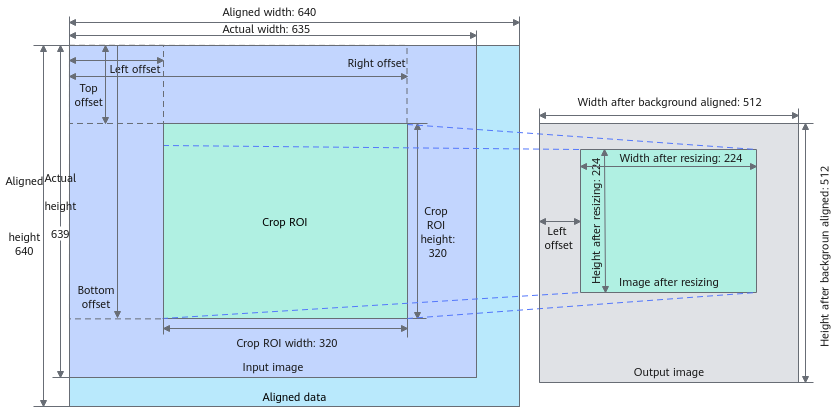
Image cropping and pasting API of the ImageProcessor class. Atlas inference product and Atlas 800I A2 inference product support asynchronous execution. For details about the image cropping and pasting effect, see Figure 1.
For details, see Cropping and Pasting.
Atlas 200/300/500 inference product supports YUV_SP_420 and YVU_SP_420 (nv12 and nv21).Atlas 200I/500 A2 inference product supports YUV_SP_420 and YVU_SP_420 (nv12 and nv21).- Atlas inference product and Atlas 800I A2 inference product support YUV_SP_420, YVU_SP_420, RGB_888 and BGR_888 (nv12, nv21, rgb, and bgr). The resolution of the RGB (BGR) image format cannot exceed 4096 x 4096.
- Crops an image from inputImage.
- The actual width and height of the input Image class range from 18 x 6 to 4096 x 4096. For images in YUV_SP_420 and YVU_SP_420 formats, the width and height can reach 8192 x 8192.
- The width and height of the cropped image cannot exceed the actual width and height of the inputImage. The minimum size of the cropped ROI is 10 x 6.
- It is recommended that the four coordinates of the cropRect be even numbers. If odd numbers are included (excluding RGB and BGR formats), the coordinate of the upper left corner is automatically rounded down to an even number, and the coordinate of the lower right corner is automatically rounded up to an even number. For example, if cropRect is set to {1, 1, 1287, 1287}, the actual width and height of the cropped image are ((1287 + 1) - (1 - 1)) = 1288.
- Resizes the image based on the size of the specified pasting region.
- Pastes the resized image to the region specified by pastedImage.
- The width and height the pasted region cannot exceed the actual width and height of the pastedImage. The pasted region size range is [10 x 6, 4096 x 4096].
- It is recommended that the four coordinates of the pasted rectangle be even numbers. If odd numbers are included (excluding RGB and BGR formats), the coordinate of the upper left corner is automatically rounded down to an even number, and the coordinate of the lower right corner is automatically rounded up to an even number.
- The upper left corner x coordinate of the pasted rectangle is a multiple of 16. Example:
- For pasteRect{17, 17, 1287, 1287}, the actual width and height of the pasted image is ((1287 + 1) - (17 - 1)) = 1272, and size is 1272 x 1272.
- For pasteRect{18, 18, 1287, 1287}, the actual width of the pasted image is ((1287 + 1) - 32) = 1256, the actual height of the pasted image is ((1287 + 1) - 18) = 1270, and the size is 1256 x 1270.
- The width and height of the pasted image cannot exceed a multiple of [1/32, 16] of the cropped image width and height for the
Atlas 200/300/500 inference product andAtlas 200I/500 A2 inference product . - For the Atlas inference product and Atlas 800I A2 inference product, the actual width of the pasted image rect must be a multiple of 16. Otherwise, invalid data will be padded. For the
Atlas 200/300/500 inference product andAtlas 200I/500 A2 inference product environment, it is recommended that the lower right x coordinate of pasted image rect is a multiple of 16.
- The output width of the pastedImage is a multiple of 16, and its output height is a multiple of 2. So the size range is [32 x 6, 4096 x 4096].
Prototype
1
|
APP_ERROR ImageProcessor::CropAndPaste(const Image& inputImage, const std::pair<Rect, Rect>& cropPasteRect, Image& pastedImage, AscendStream& stream = AscendStream::DefaultStream()); |
Parameters
|
Parameter |
Input/Output |
Description |
|---|---|---|
|
inputImage |
Input |
Image class before cropping and resizing. The Image class obtained by the Decode API and other VPC APIs can be directly used as inputs. If the user-defined Image class is used, set the original and aligned image widths and heights. |
|
cropPasteRect |
Input |
Parameter for image cropping, resizing, and pasting. The first Rect corresponds to the cropping parameter, and the second one corresponds to the resizing and pasting parameter. |
|
pastedImage |
Input/Output |
Image class after cropping. |
|
stream |
Input |
AscendStream type. The default value is AscendStream::DefaultStream(). When the parameter value is the default value, the API calling is a synchronous operation. In other cases, the API calling is an asynchronous operation. |
Response Parameters
|
Data Structure |
Description |
|---|---|
|
APP_ERROR |
For details about the returned error codes, see APP_ERROR Description. |