For the Ascend 310 AI Processor, this function is reserved and is not supported currently.
For the Ascend 910 AI Processor, this function is reserved and is not supported currently.
Description
JPEG Decoder (JPEGD) implements .jpg, .jpeg, .JPG, and .JPEG image decoding.
- JPEGD supports image rotation during image decoding.
If the input stream contains orientation information (the orientation of the camera to the scene when the image is captured), JPEGD parses the orientation information during decoding and rotates the image by 90º, 180º, or 270º, or mirrors the image. The width stride, height stride, and output buffer of the rotated image must meet the restrictions described in Restrictions on Image Formats, Width and Height Alignment, and Buffers. If the stream of the input image is abnormal, JPEGD fails to read the orientation information. As a result, the image rotation function cannot be implemented.
- JPEGD supports retaining the source image format during image decoding.
The image encoding formats before and after decoding remain consistent. For example, if the source format is JPEG(440), the destination format is YUV440SP with V component before U component or YUV440SP with U component before V component.
Use the source image format for decoding in either of the following ways:
- In the JPEGD decoding API call, set the output format to HI_PIXEL_FORMAT_UNKNOWN to get a Semi-Planar output in the source format with V component before U component. For example, if the source format is JPEG (440) and the destination format is set to HI_PIXEL_FORMAT_UNKNOWN, the JPEGD destination format is YUV440SP with V component before U component.
In this method, however, the destination format is unknown. Therefore, you must allocate the output buffer as large as possible to ensure that the output image can be stored properly, or you can obtain the size of the decoded output buffer with the hi_mpi_dvpp_get_image_info call.
- From the input source JPEG image, obtain the width, height, width stride, height stride, output buffer, and format of the output image through the hi_mpi_dvpp_get_image_info call, and then set the output format by using JPEGD decoding API based on the information obtained through the hi_mpi_dvpp_get_image_info call.

If the JPEGD destination image will be fed to a model for inference, you are advised to set the output image format to HI_PIXEL_FORMAT_UNKNOWN. In this case, JPEGD decodes with the source format preserved (ensure that the JPEGD destination format is supported by the model) to avoid inference accuracy drop.
If the JPEGD destination image will be used as the input of VPC, to decode with the source format preserved, check that VPC supports the JPEGD destination format by referring to Restrictions. If VPC does not support the JPEGD destination format, reconfigure a JPEGD destination format that is also supported by VPC.
- In the JPEGD decoding API call, set the output format to HI_PIXEL_FORMAT_UNKNOWN to get a Semi-Planar output in the source format with V component before U component. For example, if the source format is JPEG (440) and the destination format is set to HI_PIXEL_FORMAT_UNKNOWN, the JPEGD destination format is YUV440SP with V component before U component.
Resolution Restrictions
Restrictions on Image Formats, Width and Height Alignment, and Buffers
During JPEGD image decoding, hi_mpi_dvpp_malloc and hi_mpi_dvpp_free are called to allocate and free the input and output buffers on the device. The buffer lifetime is managed by the user.
- The size of the input buffer is the size of space occupied by the input image.
- For details about the output buffer size, see the formula in the following table.
JPEGD supports only Huffman coding and does not support arithmetic encoding, progressive JPEG format, or JPEG 2000 format. The color space of the input image must be YUV with YUV components in the ratio of 4:4:4, 4:2:2, 4:2:0, 4:0:0, or 4:4:0.
For details about the definition of the output image format, see hi_pixel_format. For details about the concepts such as width stride and height stride, see Terminology.
Input Format (YUV) |
Output Format |
Output Width and Height |
Output Width Stride, Height Stride, and Buffer Size |
|---|---|---|---|
JPEG(444) |
YVU444SP 8-bit |
No alignment requirement. |
Width stride: Round up the width to the nearest multiple of 64. Height stride: Round up the height to the nearest multiple of 16. Buffer size (in bytes) ≥ Width stride x Height stride x 3 |
YUV444SP 8-bit |
|||
YUV420SP NV12 8-bit |
Width: Must be a multiple of 2. Height: Must be a multiple of 2. |
Width stride: Round up the width to the nearest multiple of 64. Height stride: Round up the height to the nearest multiple of 16. Buffer size (in bytes) ≥ Width stride x Height stride x 3/2 |
|
YUV420SP NV21 8-bit |
|||
JPEG(422) |
YVU422SP 8-bit |
Width: Must be a multiple of 2. Height: No alignment requirement. |
Width stride: Round up the width to the nearest multiple of 64. Height stride: Round up the height to the nearest multiple of 16. Buffer size (in bytes) ≥ Width stride x Height stride x 2 |
YUV422SP 8-bit |
|||
YUV420SP NV12 8-bit |
Width: Must be a multiple of 2. Height: Must be a multiple of 2. |
Width stride: Round up the width to the nearest multiple of 64. Height stride: Round up the height to the nearest multiple of 16. Buffer size (in bytes) ≥ Width stride x Height stride x 3/2 |
|
YUV420SP NV21 8-bit |
|||
JPEG(420) |
YUV420SP NV12 8-bit |
Width: Must be a multiple of 2. Height: Must be a multiple of 2. |
Width stride: Round up the width to the nearest multiple of 64. Height stride: Round up the height to the nearest multiple of 16. Buffer size (in bytes) ≥ Width stride x Height stride x 3/2 |
YUV420SP NV21 8-bit |
|||
JPEG(400) |
YUV420SP NV12 8-bit |
Width: Must be a multiple of 2. Height: Must be a multiple of 2. |
Width stride: Round up the width to the nearest multiple of 64. Height stride: Round up the height to the nearest multiple of 16. Buffer size (in bytes) ≥ Width stride x Height stride x 3/2 |
YUV420SP NV21 8-bit |
|||
YUV400 8-bit |
No alignment requirement. |
Width stride: Round up the width to the nearest multiple of 64. Height stride: Round up the height to the nearest multiple of 16. Buffer size (in bytes) ≥ Width stride x Height stride |
|
JPEG(440) |
YVU440SP 8-bit |
Width: No alignment requirement. Height: Must be a multiple of 2. |
Width stride: Round up the width to the nearest multiple of 64. Height stride: Round up the height to the nearest multiple of 16. Buffer size (in bytes) ≥ Width stride x Height stride x 2 |
YUV440SP 8-bit |
|||
YUV420SP NV12 8-bit |
Width: Must be a multiple of 2. Height: Must be a multiple of 2. |
Width stride: Round up the width to the nearest multiple of 64. Height stride: Round up the height to the nearest multiple of 16. Buffer size (in bytes) ≥ Width stride x Height stride x 3/2 |
|
YUV420SP NV21 8-bit |
Requirements for Software and Hardware
- Hardware requirements
- A maximum of four Huffman tables are supported, including two direct current (DC) coefficient tables and two alternating current (AC) coefficient tables.
- A maximum of three quantization tables are supported.
- Only 8-bit sampling is supported.
- Only sequentially-encoded images can be decoded.
- Only JPEG decoding based on discrete cosine transform (DCT) is supported.
- Only one start of scan (SOS) marker is allowed for image decoding.
- Software requirements
- A maximum of three SOS markers are allowed for image decoding.
- Abnormal image decoding with insufficient Minimum Coded Unit (MCU) data is supported.
Accuracy Restrictions
In the event of JPEGD+VPC cascade, width stride x height stride of the JPEGD output image must be a multiple of 64 x 16, which means that the width and height of the JPEGD output have invalid paddings. Therefore, before VPC processes the image, the JPEGD output image should be cropped based on the original resolution to eliminate the impact of invalid data on inference accuracy.
Precautions
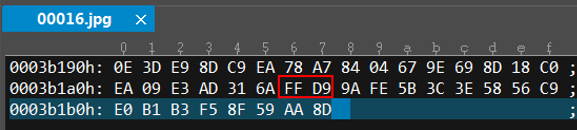
If user-defined data exists after the end of image (EOI) marker 0xFFD9, JPEGD clears the 8-byte data after the EOI during decoding. If you want to retain the user-defined data, read it to the buffer and back it up before sending it to JPEGD.
To check whether user-defined data exists after the EOI in an image, use the binary viewing tool to open the image. For example, user-defined data exists after the EOI marker FFD9 in the following figure.