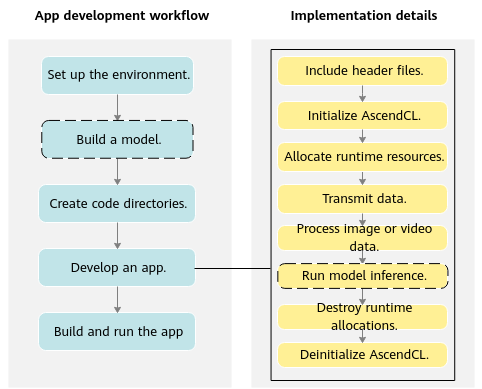
- Set up the environment.
For details, see Development and Operating Environment Setup.
- Create code directories.
Before developing an app, you must create directories to store the code files, build scripts, test images, and model files.
The following is an example:
├App name
├── model                 // Model files
│   ├── xxx.json

├── data
│   ├── xxxxxx           // Test data

├── inc                     // Header files that declare functions
│   ├── xxx.h

├── out                   // Output files

├── src
│   ├── xxx.json         // Configuration files for system initialization
│   ├── CMakeLists.txt   // Build script
│   ├── xxx.cpp          // Implementation files
- (Optional) Build a model.
For model inference, the .om offline model adapted to the Ascend AI Processor is mandatory. For details, see Building a Model.

If model inference is involved in an app, you need to build a model.
- Develop an app.
For details about the required header files and library files, see Dependent Header Files and Library Files.
Ascend 310 AI Processor: For details about media data processing, see Media Data Processing V1.
Ascend 910 AI Processor: For details about media data processing, see Media Data Processing V1.
Ascend 310P AI Processor: For details about media data processing, see Media Data Processing V1 and Media Data Processing V2.
If model inference is involved in an app, write code by referring to Model Inference and More Features.
- Build and run the app. For details, see App Build and Run.