Ascend PyTorch Profiler is developed for the PyTorch framework. By adding Ascend PyTorch Profiler to PyTorch training/online inference scripts, profile data can be collected during training/online inference and visualized as profile data files upon completion of training/online inference, improving the profiling efficiency. Ascend PyTorch Profiler can collect complete profile data in PyTorch training/online inference scenarios, including information about operators at the PyTorch and CANN layers, bottom-layer NPU operators, and operator memory usages, providing a comprehensive analysis on performance status during PyTorch training/online inference.
Ascend PyTorch Profiler supports profiling using the following APIs:
- torch_npu.profiler.profile
Complete profiling APIs. You can add the APIs to the code to select the data to be profiled.
- dynamic_profile
Profiling at any time during training. You can start profiling without modifying the user code, which is more flexible.
- torch_npu.profiler._KinetoProfile
Basic profiling method
Other functions:
- (Optional) mstx Data Collection and Parsing
- (Optional) Environment Variable Profiling
- (Optional) Marking the Profiling Process With Custom Character String Keys and Values
- (Optional) Memory Visualization
- (Optional) Creating Child Profiler Threads
References:
- Ascend PyTorch Profiler APIs
- profiler_config.json File
- experimental_config Parameter Description (dynamic_profile Scenario)
- experimental_config Parameter Description
- torch_npu.profiler.schedule Parameter Description
- Using dynamic_profile for Dynamic Profiling of Maintenance and Test Logs
Restrictions
- The Ascend PyTorch Profiler APIs support multiple profiling methods, but these methods cannot be enabled at the same time.
- Ensure that the Ascend PyTorch Profiler APIs are called in the same process as the service process to be profiled.
- The Ascend PyTorch Profiler APIs profile data by mapping processes to devices as follows:
- Multi-process to multi-device: one profiling process for each device
- Single-process to multi-device: supported. PyTorch 2.1.0.post14, 2.5.1.post2, 2.6.0, or later is required.
- Multi-process to single-device: Ensure that the profiling processes are in serial sequence, that is, the profiling processes do not start at the same time, and each profiling process is complete from start to stop.
- Profile data occupies certain disk space. As a result, the server may be unavailable when the disk space is used up. Profile data size depends on model parameters, profiling settings, and the iteration count. Make sure the storage location has enough free disk space.
Prerequisites
- Ensure that operations in Before You Start have been completed.
- You have prepared a model trained on PyTorch 2.1.0 or later and a matched dataset, and port the model to the the Ascend AI Processor. For details, see Model Porting in Traditional Model Performance Tuning Guide.
Profiling and Profile Data Parsing (torch_npu.profiler.profile)
- Add the following sample code to the training script (for example, train_*.py)/online inference script to configure profiling parameters, and then start the training/online inference.

- For details about the torch_npu.profiler.profile API in the following sample code, see Ascend PyTorch Profiler APIs.
- The following provides two samples of calling the torch_npu.profiler.profile API:
- Example 1: Use the WITH statement to call the torch_npu.profiler.profile API to automatically create a profiler and collect profile data within the range specified by WITH.
 1
 2
 3
 4
 5
 6
 7
 8
 9
10
11
12
13
14
15
16
17
18
19
20
21
22
23
24
25
26
27
28
29
30
31
32
33
34
35
36
37
38
39
40
41
42
43
44
45
46
import torch
import torch_npu

...

# Add extended configuration parameters for profiling. For details, see the following parameter description.
experimental_config = torch_npu.profiler._ExperimentalConfig(
    export_type=[
        torch_npu.profiler.ExportType.Text
        ],
    profiler_level=torch_npu.profiler.ProfilerLevel.Level0,
    mstx=False,    # The original parameter name msprof_tx is changed to mstx. The new version is compatible with the original parameter name msprof_tx.
    mstx_domain_include=[],
    mstx_domain_exclude=[],
    aic_metrics=torch_npu.profiler.AiCMetrics.AiCoreNone,
    l2_cache=False,
    op_attr=False,
    data_simplification=False,
    record_op_args=False,
    gc_detect_threshold=None,
    host_sys=[
        torch_npu.profiler.HostSystem.CPU,
        torch_npu.profiler.HostSystem.MEM],
    sys_io=False,
    sys_interconnection=False
)

# Add basic configuration parameters for profiling. For details, see the following parameter description.
with torch_npu.profiler.profile(
    activities=[
        torch_npu.profiler.ProfilerActivity.CPU,
        torch_npu.profiler.ProfilerActivity.NPU
        ],
    schedule=torch_npu.profiler.schedule(wait=0, warmup=0, active=1, repeat=1, skip_first=1),    # Used with prof.step().
    on_trace_ready=torch_npu.profiler.tensorboard_trace_handler("./result"),
    record_shapes=False,
    profile_memory=False,
    with_stack=False,
    with_modules=False,
    with_flops=False,
    experimental_config=experimental_config) as prof:

    # Start profiling.
    for step in range(steps):
        train_one_step(step, steps, train_loader, model, optimizer, criterion)
        prof.step()    # Used with schedule.
- Example 2: Create a torch_npu.profiler.profile object and use the start and stop APIs to control profiling. You can set a custom location to begin profiling.
 1
 2
 3
 4
 5
 6
 7
 8
 9
10
11
12
13
14
15
16
17
18
19
20
21
22
23
24
25
26
27
28
29
30
31
32
33
34
35
36
37
38
39
40
41
42
43
44
import torch
import torch_npu
...

# Add extended configuration parameters for profiling. For details, see the following parameter description.
experimental_config = torch_npu.profiler._ExperimentalConfig(
    export_type=[
        torch_npu.profiler.ExportType.Text
        ],
    profiler_level=torch_npu.profiler.ProfilerLevel.Level0,
    mstx=False,    # The original parameter name msprof_tx is changed to mstx. The new version is compatible with the original parameter name msprof_tx.
    aic_metrics=torch_npu.profiler.AiCMetrics.AiCoreNone,
    l2_cache=False,
    op_attr=False,
    data_simplification=False,
    record_op_args=False,
    gc_detect_threshold=None,
    host_sys=[
        torch_npu.profiler.HostSystem.CPU,
        torch_npu.profiler.HostSystem.MEM],
    sys_io=False,
    sys_interconnection=False
)

# Add basic configuration parameters for profiling. For details, see the following parameter description.
prof = torch_npu.profiler.profile(
    activities=[
        torch_npu.profiler.ProfilerActivity.CPU,
        torch_npu.profiler.ProfilerActivity.NPU
        ],
    schedule=torch_npu.profiler.schedule(wait=0, warmup=0, active=1, repeat=1, skip_first=1),
    on_trace_ready=torch_npu.profiler.tensorboard_trace_handler("./result"),
    record_shapes=False,
    profile_memory=False,
    with_stack=False,
    with_modules=False,
    with_flops=False,
    experimental_config=experimental_config)

prof.start()    # Start profiling.
for step in range(steps):
    train_one_step()
    prof.step()    # Used with schedule.
prof.stop()    # Stop profiling.
In the preceding examples, tensorboard_trace_handler is used to export profile data. You can also use prof.export_chrome_trace to export the profile data of a single file chrome_trace_{pid}.json. The profile data exported by tensorboard_trace_handler contains the profile data exported by prof.export_chrome_trace. You can select either method based on the actual requirements.1 2 3 4 5 6 7 8 9 10 11
import torch import torch_npu ... with torch_npu.profiler.profile() as prof: # Start profiling. for step in range(steps): train_one_step(step, steps, train_loader, model, optimizer, criterion) prof.export_chrome_trace('./chrome_trace_14.json')
- Parse profile data.
Automatic parsing (see tensorboard_trace_handler and prof.export_chrome_trace in the preceding sample code) and offline parsing are supported.
- View and analyze the profile data result files.
For details about profile data result files, see MindSpore & PyTorch Profile Data File References.
For details about how to visualize and analyze the parsed profile data files, see MindStudio Insight User Guide.
You can use the msprof-analyze to analyze the profile data.
Profiling and Profile Data Parsing (dynamic_profile)
dynamic_profile is used to start the profiling process at any time during model training/online inference.
Use only one of the following methods to enable dynamic_profile.
Method |
Description |
|---|---|
Using an environment variable |
This method is supported only in training scenarios. You can modify the profiler_config.json configuration file to control profiling, without the need to modify the user code. |
Modify the user training/online inference script by adding the dynamic_profile API. |
This method is supported in training/online inference scenarios. You can pass profiling configurations by modifying the profiler_config.json configuration file. You need to add the dynamic_profile API to the user script in advance. |
Modifying the user training/online inference script by adding the dp.start() function of dynamic_profile |
This method is supported in training/online inference scenarios. You can add dp.start() to the user script in advance to control the profiling startup. You can customize the position where dp.start() is added. This method is suitable when the profiling scope needs to be narrowed down. |
Using an environment variable
- Configure the following environment variable:
export PROF_CONFIG_PATH="/path/to/profiler_config_path"
After this environment variable is configured and training is started, dynamic_profile automatically creates the template file profiler_config.json in profiler_config_path. You can modify configuration options based on the template file.
- This method applies only to training scenarios.
- In this method, dynamic_profile cannot sample data of the first iteration (step 0).
- This method depends on the profiling steps in the training process of the Torch native Optimizer.step(). A custom optimizer is not supported.
- The path specified by PROF_CONFIG_PATH can be customized (read and write permissions are required). The path can contain only letters, digits, underscores (_), and hyphens (-). Soft links are not supported, for example, "/home/xxx/profiler_config_path".
- Start a training task.
- Open a new CLI and modify the profiler_config.json file to enable the profiling task.The configuration file contains the profile data collection parameters of the profiler. Refer to profiler_config.json File to modify the parameters in the configuration file to execute different profiling tasks.
- dynamic_profile determines whether the profiler_config.json file is modified by identifying the status of the file.
- dynamic_profile polls every two seconds. If the profiler_config.json file is modified, the profiling process is started. Then, the running interval between step 10 and step 11 is recorded and used as the new polling interval. The minimum interval is one second.
- If the profiler_config.json file is modified during dynamic_profile, dynamic_profile is started again after the profiling process ends.
- You are advised to use shared storage to set profiler_config_path of dynamic_profile.
- The dynamic_profile maintenance and test logs are automatically recorded in the profiler_config_path directory. For details, see Using dynamic_profile for Dynamic Profiling of Maintenance and Test Logs.
- The value of start_step must be greater than the current training/online inference steps and cannot exceed the maximum steps. For example, if the total number of steps is 10 and step 3 has been executed, the value of start_step must be between 3 and 10. Since the training/online inference task is still being executed during the configuration, the value of start_step must be greater than step 3.
- dynamic_profile determines whether the profiler_config.json file is modified by identifying the status of the file.
- Parse profile data.
Automatic parsing and manual parsing are supported. For details, see the analyse parameter in Table 6.
- View and analyze the profile data result files.
For details about profile data result files, see MindSpore & PyTorch Profile Data File References.
For details about how to visualize and analyze the parsed profile data files, see MindStudio Insight User Guide.
You can use the msprof-analyze to analyze the profile data.
Modifying the user training/online inference script by adding the dynamic_profile API
- Add the following sample code to the training script (for example, train_*.py)/online inference script.
1 2 3 4 5 6 7 8 9
# Load the dynamic_profile module. from torch_npu.profiler import dynamic_profile as dp # Set the path of the profiling configuration file. dp.init("profiler_config_path") ... for step in steps: train_one_step() # Divide steps. dp.step()
When init is executed, dynamic_profile automatically creates the template file profiler_config.json in profiler_config_path. You can modify configuration items based on the template file.
profiler_config_path can contain only letters, digits, underscores (_), and hyphens (-). Soft links are not supported.
- Start a training/online inference task.
- Open a new CLI and modify the profiler_config.json file to enable the profiling task.The configuration file contains the profile data collection parameters of the profiler. Refer to profiler_config.json File to modify the parameters in the configuration file to execute different profiling tasks.
- dynamic_profile determines whether the profiler_config.json file is modified by identifying the status of the file.
- dynamic_profile polls every two seconds. If the profiler_config.json file is modified, the profiling process is started. Then, the running interval between step 10 and step 11 is recorded and used as the new polling interval. The minimum interval is one second.
- If the profiler_config.json file is modified during dynamic_profile, dynamic_profile is started again after the profiling process ends.
- You are advised to use shared storage to set profiler_config_path of dynamic_profile.
- The dynamic_profile maintenance and test logs are automatically recorded in the profiler_config_path directory. For details, see Using dynamic_profile for Dynamic Profiling of Maintenance and Test Logs.
- The value of start_step must be greater than the current training/online inference steps and cannot exceed the maximum steps. For example, if the total number of steps is 10 and step 3 has been executed, the value of start_step must be between 3 and 10. Since the training/online inference task is still being executed during the configuration, the value of start_step must be greater than step 3.
- dynamic_profile determines whether the profiler_config.json file is modified by identifying the status of the file.
- Automatic parsing and manual parsing are supported. For details, see the analyse parameter in Table 6.
- View and analyze the profile data result files.
For details about profile data result files, see MindSpore & PyTorch Profile Data File References.
For details about how to visualize and analyze the parsed profile data files, see MindStudio Insight User Guide.
You can use the msprof-analyze to analyze the profile data.
Modifying the user training/online inference script by adding the dp.start() function of dynamic_profile
- Add the following sample code to the training script (for example, train_*.py)/online inference script.
1 2 3 4 5 6 7 8 9 10 11 12
# Load the dynamic_profile module. from torch_npu.profiler import dynamic_profile as dp # Set the path to the profiling configuration file of the init API. dp.init("profiler_config_path") ... for step in steps: if step==5: # Set the path to the profiling configuration file of the start API. dp.start("start_config_path") train_one_step() # Divide steps. The code that requires profiling must be loaded between dp.start() and dp.step(). dp.step()
start_config_path is also specified as the path to profiler_config.json. However, you need to manually create a configuration file by referring to profiler_config.json File and set parameters as required. The file name must be specified, for example, dp.start("/home/xx/start_config_path/profiler_config.json").
profiler_config_path and start_config_path can contain only letters, digits, underscores (_), and hyphens (-). Soft links are not supported.
- After the dp.start() function is added, when a training/online inference task proceeds to dp.start(), data is automatically profiled based on the profiler_config.json file specified by start_config_path. The dp.start() function does not detect the modification of the profiler_config.json file. It triggers a profiling task only during training/online inference.
- After the dp.start() function is added and the training/online inference is started:
- If the profiler_config.json configuration file is not specified in dp.start() or the configuration file does not take effect due to an error, sample data based on the profiler_config.json configuration file in the profiler_config_path directory when the task is proceeded to dp.start()
- If the script proceeds to dp.start() when the dynamic_profile configured in dp.init() is valid, dp.start() does not take effect.
- If the script proceeds to dp.start() after dynamic_profile finishes as specified in dp.init(), the script continues profiling with dp.start() and generates a new profile data file directory in the prof_dir directory.
- If the profiler_config.json file in the profiler_config_path directory is modified while the dynamic_profile configured in dp.start() is valid, dp.init() starts after the dp.start() profiling finishes and a new profile data file is generated in the prof_dir directory.
- You are advised to use shared storage to set profiler_config_path of dynamic_profile.
- The value of start_step must be greater than the current training/online inference steps and cannot exceed the maximum steps. For example, if the total number of steps is 10 and step 3 has been executed, the value of start_step must be between 3 and 10. Since the training/online inference task is still being executed during the configuration, the value of start_step must be greater than step 3.
- Start a training/online inference task.
- Parse profile data.
Automatic parsing and manual parsing are supported. For details, see the analyse parameter in Table 6.
- View and analyze the profile data result files.
For details about profile data result files, see MindSpore & PyTorch Profile Data File References.
For details about how to visualize and analyze the parsed profile data files, see MindStudio Insight User Guide.
You can use the msprof-analyze to analyze the profile data.
Profiling and Profile Data Parsing (torch_npu.profiler._KinetoProfile)
- Add the following sample code to the training script (for example, train_*.py)/online inference script to configure profiling parameters, and then start the training/online inference.
For details about the torch_npu.profiler._KinetoProfile API in the following sample code, see Ascend PyTorch Profiler APIs.
1 2 3 4 5 6 7 8 9 10 11 12 13
import torch import torch_npu ... prof = torch_npu.profiler._KinetoProfile(activities=None, record_shapes=False, profile_memory=False, with_stack=False, with_flops=False, with_modules=False, experimental_config=None) for epoch in range(epochs): train_model_step() if epoch == 0: prof.start() if epoch == 1: prof.stop() prof.export_chrome_trace("result_dir/trace.json")
In this method, schedule and tensorboard_trace_handler cannot be used to export profile data.
- Parse profile data.
Automatic parsing is supported. For details, see prof.export_chrome_trace in the preceding sample code.
- View and analyze the profile data result files.
For details about profile data result files, see MindSpore & PyTorch Profile Data File References.
For details about how to visualize and analyze the parsed profile data files, see MindStudio Insight User Guide.
You can use the msprof-analyze to analyze the profile data.
(Optional) mstx Data Collection and Parsing
In large cluster scenarios, traditional profiling involves a large amount of data and complex analysis process. You can use the mstx parameter of experimental_config to enable custom tracing, specify the profiling period or the start and end times of key functions, and identify key functions or iterations to quickly demarcate performance issues.
The usage and sample code are as follows:
- Enable torch_npu.profiler and mstx, set profiler_level to Level_none (the level can be configured as required), and set mstx_domain_include or mstx_domain_exclude to profile data.
- In the PyTorch script, call the tracing APIs torch_npu.npu.mstx, torch_npu.npu.mstx.mark, torch_npu.npu.mstx.range_start, torch_npu.npu.mstx.range_end, torch_npu.npu.mstx.mstx_range to profile required events. For details about the APIs, see TorchNPU Custom APIs.
Only the range duration on the host is recorded.
1 2 3 | id = torch_npu.npu.mstx.range_start("dataloader", None) # If the second input parameter is set to None or not set, only the range duration on the host is recorded. dataloader() torch_npu.npu.mstx.range_end(id) |
Mark IDs on compute streams to record the range durations on the host and device.
1 2 3 4 | stream = torch_npu.npu.current_stream() id = torch_npu.npu.mstx.range_start("matmul", stream) # Set the second input parameter to a valid stream, record the range durations on the host and devices. torch.matmul() # Compute stream operations. torch_npu.npu.mstx.range_end(id) |
Mark IDs on the collective communication stream.
1 2 3 4 5 6 7 8 9 10 11 12 13 | from torch.distributed.distributed_c10d import _world if (torch.__version__ != '1.11.0') : stream_id = _world.default_pg._get_backend(torch.device('npu'))._get_stream_id(False) collective_stream = torch.npu.Stream(stream_id=stream_id, device_type=20, device_index=device_id) # Use device_index to specify device IDs of actual services. else: stream_id = _world.default_pg._get_stream_id(False) current_stream = torch.npu.current_stream() cdata = current_stream._cdata & 0xffff000000000000 collective_stream = torch.npu.Stream(_cdata=( stream_id + cdata), device_index=device_id) # Use device_index to specify device IDs of actual services. id = torch_npu.npu.mstx.range_start("allreduce", collective_stream) # Set the second input parameter to a valid stream, record the range durations on the host and devices. torch.allreduce() # Collective communication stream operations. torch_npu.npu.mstx.range_end(id) |
Mark IDs on the P2P communication stream.
1 2 3 4 5 6 7 8 9 10 11 12 13 | from torch.distributed.distributed_c10d import _world if (torch.__version__ != '1.11.0') : stream_id = _world.default_pg._get_backend(torch.device('npu'))._get_stream_id(True) p2p_stream = torch.npu.Stream(stream_id=stream_id, device_type=20, device_index=device_id) # Use device_index to specify device IDs of actual services. else: stream_id = _world.default_pg._get_stream_id(True) current_stream = torch.npu.current_stream() cdata = current_stream._cdata & 0xffff000000000000 p2p_stream = torch.npu.Stream(_cdata=( stream_id + cdata), device_index=device_id) # Use device_index to specify device IDs of actual services. id = torch_npu.npu.mstx.range_start("send", p2p_stream) # Set the second input parameter to a valid stream, record the range durations on the host and devices. torch.send() torch_npu.npu.mstx.range_end(id) |
To profile data in these scenarios, configure the torch_npu.profiler.profile API and enable mstx. The following is an example:
1 2 3 4 5 6 7 8 9 10 11 12 13 14 15 16 17 | import torch import torch_npu experimental_config = torch_npu.profiler._ExperimentalConfig( profiler_level=torch_npu.profiler.ProfilerLevel.Level_none, mstx=True, # The original parameter name msprof_tx is changed to mstx. The new name is compatible with the original name. export_type=[ torch_npu.profiler.ExportType.Db ]) with torch_npu.profiler.profile( schedule=torch_npu.profiler.schedule(wait=1, warmup=1, active=2, repeat=1, skip_first=1), on_trace_ready=torch_npu.profiler.tensorboard_trace_handler("./result"), experimental_config=experimental_config) as prof: for step in range(steps): train_one_step() # User code, including the mstx call prof.step() |
Profile by domain.
import torch
import torch_npu
import time
experimental_config = torch_npu.profiler._ExperimentalConfig(
data_simplification=False,
# Enable mstx and configure mstx_domain_include or mstx_domain_exclude.
mstx=True,
mstx_domain_include=['default','domain1'] # Profile 'default' and 'domain1'.
# mstx_domain_exclude=['domain2'] # Do not profile 'domain2'. This parameter cannot be configured together with mstx_domain_include.
)
with torch_npu.profiler.profile(
activities=[torch_npu.profiler.ProfilerActivity.CPU, torch_npu.profiler.ProfilerActivity.NPU],
schedule=torch_npu.profiler.schedule(wait=1, warmup=0, active=1, repeat=1, skip_first=1),
on_trace_ready=torch_npu.profiler.tensorboard_trace_handler("./result"),
experimental_config=experimental_config) as prof:
for i in range(5):
# Mark the default domain.
torch_npu.npu.mstx.mark("mark_with_default_domain")
range_id = torch_npu.npu.mstx.range_start("range_with_default_domain")
time.sleep(1) # Simulate user code.
torch_npu.npu.mstx.range_end(range_id)
... # User code.
# Mark the custom domain1.
torch_npu.npu.mstx.mark("mark_with_domain1", domain = "domain1")
range_id1 = torch_npu.npu.mstx.range_start("range_with_domain1", domain="domain1")
time.sleep(1) # Simulate user code.
torch_npu.npu.mstx.range_end(range_id1, domain="domain1")
... # User code.
# Mark the custom domain2.
torch_npu.npu.mstx.mark("mark_with_domain2", domain = "domain2")
range_id2 = torch_npu.npu.mstx.range_start("range_with_domain2", domain="domain2")
time.sleep(1) # Simulate user code.
torch_npu.npu.mstx.range_end(range_id2, domain="domain2")
prof.step()
Use MindStudio Insight to open the tracing data. The following figure shows the visualization view.
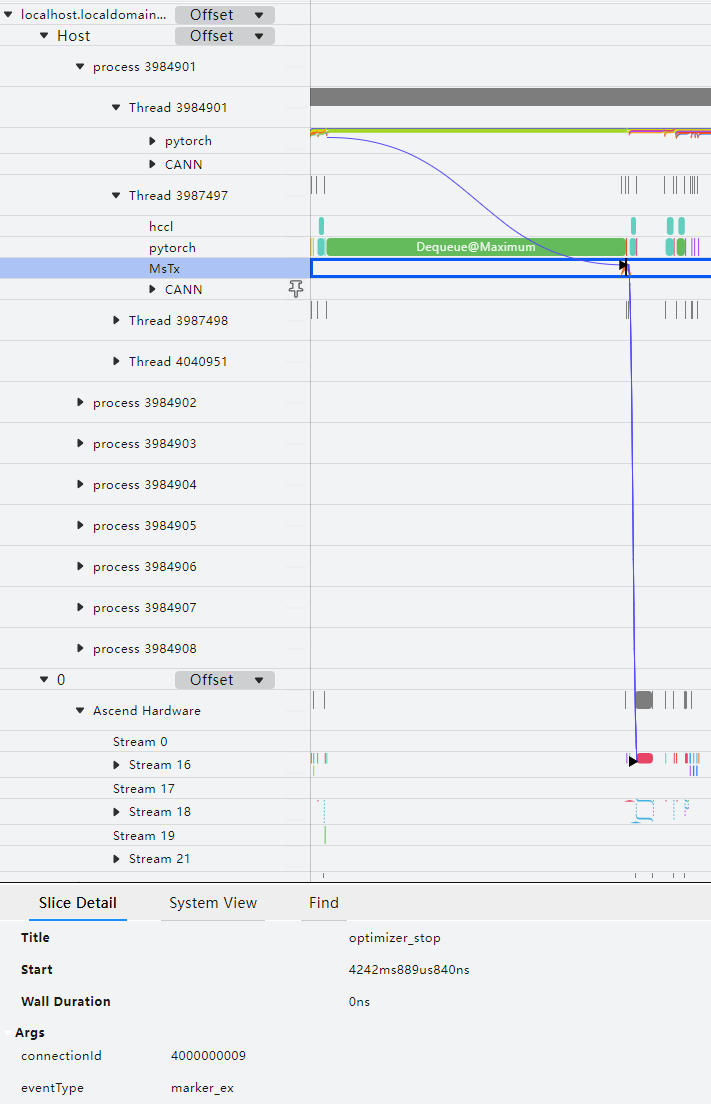
By default, mstx profiles communication operators, DataLoader processing time, and checkpoint saving duration.
- Format: {"streamId": "{pg streamId}","count": "{count}","dataType": "{dataType}",["srcRank": "{srcRank}"],["destRank": "{destRank}"],"groupName": "{groupName}","opName": "{opName}"}
Example: {"streamId": "32","count": "25701386","dataType": "fp16","groupName": "group_name_43","opName": "HcclAllreduce"}
- streamId: stream ID for data tracing
- count: number of input data records
- dataType: input data type
- srcRank: rank ID of the data sender in the communicator. This parameter applies exclusively to the hcclRecv operator.
- destRank: rank ID of the data receiver in the communicator. This parameter applies exclusively to the hcclSend operator.
- groupName: communicator name
- opName: operator name
- dataloader
- save_checkpoint
In addition, with the mstx function, you can use the mstx_torch_plugin to obtain the profile data of dataloader, forward, step, and save_checkpoint in the PyTorch model. For details, see mstx_torch_plugin.
This function allows you to view the execution and scheduling status of custom tracing from the framework to the CANN layer and then to the NPU, helping you identify key functions or events to be observed and demarcate performance issues.
For details about mstx profiling results, see msproftx Data Description.
(Optional) Environment Variable Profiling
The Ascend PyTorch Profiler APIs profile environment variable information by default. The following environment variables can be profiled:
- "ASCEND_GLOBAL_LOG_LEVEL"
- "HCCL_RDMA_TC"
- "HCCL_RDMA_SL"
- "ACLNN_CACHE_LIMIT"
Procedure
- Configure environment variables. The following is an example:
export ASCEND_GLOBAL_LOG_LEVEL=1 export HCCL_RDMA_TC=0 export HCCL_RDMA_SL=0 export ACLNN_CACHE_LIMIT=4096
Set the environment variables based on the actual requirements.
- Call the Ascend PyTorch Profiler API for profiling.
- View the result data.
- When export_type of experimental_config is set to torch_npu.profiler.ExportType.Text, the environment variables configured in the preceding steps are stored in the profiler_metadata.json file in the {worker_name}_{timestamp}_ascend_pt directory and the META_DATA table in the ascend_pytorch_profiler_{Rank_ID}.db file.
- When export_type of experimental_config is set to torch_npu.profiler.ExportType.Db, the environment variable information is written to the META_DATA table in the ascend_pytorch_profiler_{Rank_ID}.db file.
(Optional) Marking the Profiling Process With Custom Character String Keys and Values
- Example 1
1 2
with torch_npu.profiler.profile(...) as prof: prof.add_metadata(key, value)
- Example 2
1 2
with torch_npu.profiler._KinetoProfile(...) as prof: prof.add_metadata_json(key, value)
add_metadata and add_metadata_json can be configured under torch_npu.profiler.profile and torch_npu.profiler._KinetoProfile. They need to be added in the code of the profile data collection process, after profiler initialization and before finalization.
Class and Function Name |
Description |
||
|---|---|---|---|
add_metadata |
Adds the character string flag. The options are as follows:
Example:
|
||
add_metadata_json |
Adds the character string flag in JSON format. The options are as follows:
Example:
|
The metadata passed by calling this API is written to the profiler_metadata.json file in the root directory of the collection results of the Ascend PyTorch Profiler APIs.
(Optional) Memory Visualization
The function classifies and displays the occupied data when the training process occupies the storage space during model training. Export the visualization file memory_timeline.html via export_memory_timeline. To output an HTML file, you need to install matplotlib in the Python environment and set torch_npu.profiler.profile to True. In addition, if you use this function, an ascend_pt data file is generated in the current directory. The following is an example:
1 2 3 4 5 6 7 8 9 10 11 12 13 14 15 16 17 18 19 20 21 22 | import torch import torch_npu ... def trace_handler(prof: torch_npu.profiler.profile): prof.export_memory_timeline(output_path="./memory_timeline.html", device="npu:0") with torch_npu.profiler.profile( activities=[ torch_npu.profiler.ProfilerActivity.CPU, torch_npu.profiler.ProfilerActivity.NPU ], schedule=torch_npu.profiler.schedule(wait=0, warmup=0, active=4, repeat=1, skip_first=0), on_trace_ready=trace_handler, record_shapes=True, # Set it to True. profile_memory=True, # Set it to True. with_stack=True, # Set either with_stack or with_modules to True. with_modules=True ) as prof: for _ in range(steps): ... prof.step() |
After profiling, the memory_timeline.html file is exported, with the following visualization effect:
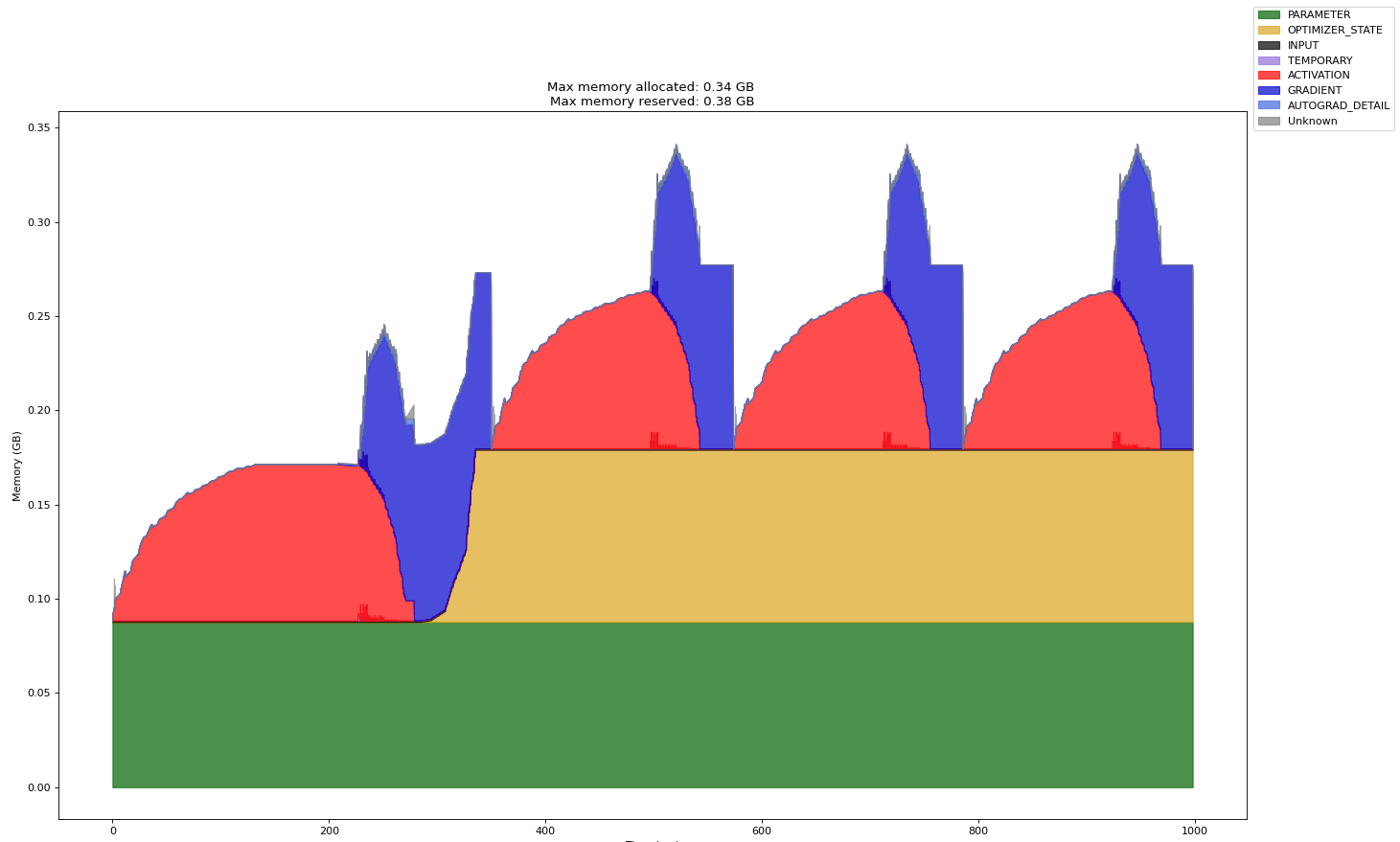
- Time (ms): horizontal coordinate, indicating the memory occupation time of the tensors, in ms
- Memory (GB): vertical coordinate, indicating the memory size occupied by the tensors, in GB
- Max memory allocated: allocated maximum memory, in GB
- Max memory reserved: reserved maximum memory, in GB
- PARAMETER: model parameters and model weights
- OPTIMIZER_STATE: optimizer status. Example: The Adam optimizer records specific status during model training.
- INPUT: input data
- TEMPORARY: Temporarily occupied. It is defined as tensors that are allocated and then released for a single operator. Generally, these tensors store intermediate values.
- ACTIVATION: activation values obtained in forward pass
- GRADIENT: gradient value
- AUTOGRAD_DETAIL: memory usage generated during backward pass
- UNKNOWN: unknown type
(Optional) Creating Child Profiler Threads
In inference scenarios, it is common to call the torch operator in a single process with multiple threads. In this case, the profiler cannot detect the child threads created by users. As a result, it cannot profile framework data such as torch operators delivered by these child threads. In this case, you can call the torch_npu.profiler.profile.enable_profiler_in_child_thread and torch_npu.profiler.profile.disable_profiler_in_child_thread APIs in the child threads created by users to register the profiler callback function and profile framework data such as torch operators delivered by the child threads.
Example:
1 2 3 4 5 6 7 8 9 10 11 12 13 14 15 16 17 18 19 20 21 22 23 24 25 26 27 28 29 30 31 32 33 34 35 36 37 38 39 40 41 42 43 44 45 46 47 48 49 50 51 52 53 54 | import threading import torch import torch_npu # Define the inference model. ... def infer(device, child_thread): torch.npu.set_device(device) if child_thread: # Start to profile framework data such as the torch operators of child threads. torch_npu.profiler.profile.enable_profiler_in_child_thread(with_modules=True) for _ in range(5): outputs = model(input_data) if child_thread: # Stop to profile framework data such as the torch operators of child threads. torch_npu.profiler.profile.disable_profiler_in_child_thread() if __name__ == "__main__": experimental_config = torch_npu.profiler._ExperimentalConfig( aic_metrics=torch_npu.profiler.AiCMetrics.PipeUtilization, profiler_level=torch_npu.profiler.ProfilerLevel.Level1 ) prof = torch_npu.profiler.profile( activities=[torch_npu.profiler.ProfilerActivity.CPU, torch_npu.profiler.ProfilerActivity.NPU], on_trace_ready=torch_npu.profiler.tensorboard_trace_handler("./result"), record_shapes=True, profile_memory=True, with_stack=False, with_flops=False, with_modules=True, experimental_config=experimental_config) prof.start() threads = [] for i in range(1, 3): # Create two child threads and run an inference task on devices 1 and 2, respectively. t = threading.Thread(target=infer, args=(i, True)) t.start() threads.append(t) # Run an inference task on device 0 in the main thread. Data is profiled by the profiler instead of enable_profiler_in_child_thread. infer(0, False) for t in threads: t.join() prof.stop() |
After the child thread profiling is complete, the generated child thread profile data is as follows:
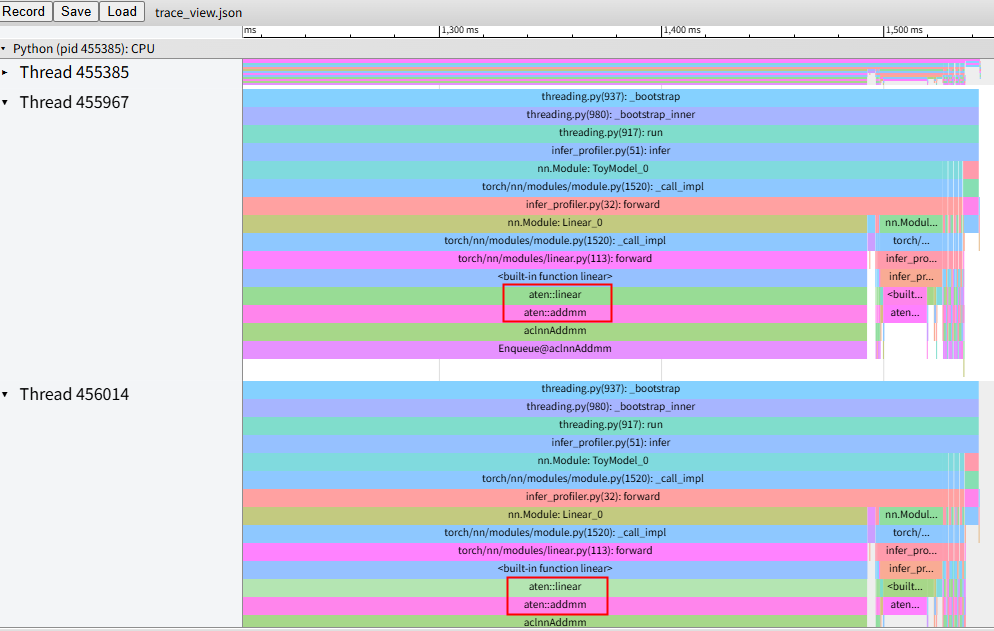
In the figure, Thread 455385 is the main thread, which can be properly collected by profiler. The timeline prefixed by aten in the other two threads is the profiled torch operator data.
Ascend PyTorch Profiler APIs
Parameter |
Description |
Required (Yes/No) |
|---|---|---|
activities |
CPU/NPU event collection list. The value is of the Enum type. Possible values are as follows:
By default, both switches are enabled. |
No |
schedule |
Behavior of each step, which is of the Callable type. It is controlled by the schedule class. By default, no operation is performed. This parameter is not supported by torch_npu.profiler._KinetoProfile. |
No |
on_trace_ready |
Operation automatically performed after the collection ends. The value is of the Callable type. Currently, the tensorboard_trace_handler function is supported. When the volume of profiled data is too large for direct parsing in the current environment, or the training/online inference process is interrupted during the profiling and only partial profile data is obtained, offline parsing can be used. By default, no operation is performed. This parameter is not supported by torch_npu.profiler._KinetoProfile. NOTE:
In the multi-rank cluster scenario where shared storage is used, if on_trace_ready is used to execute tensorboard_trace_handler to flush profile data, the profile data of multiple ranks may be directly flushed to the shared storage, causing performance overhead. Refer to Mitigating Profiling Overhead from Direct Shared-Storage Flushing in Large-Scale Multi-Device PyTorch Clusters for troubleshooting. |
No |
record_shapes |
InputShapes and InputTypes of an operator. The value is of the Boolean type. Possible values are as follows:
This parameter takes effect when torch_npu.profiler.ProfilerActivity.CPU is enabled. |
No |
profile_memory |
Memory usage of an operator. The value is of the Boolean type. Possible values are as follows:
When torch_npu.profiler.ProfilerActivity.CPU is enabled, the memory usage of the framework is profiled. When torch_npu.profiler.ProfilerActivity.NPU is enabled, the memory usage of CANN is profiled. NOTE:
Collecting memory data in the environment where glibc (earlier than 2.34) is installed may trigger a known Bug 19329. You can solve this problem by upgrading the glibc version. |
No |
with_stack |
Operator call stack. The value is of the Boolean type. It includes the call information at the framework layer and CPU operator layer. Possible values are as follows:
This parameter takes effect when torch_npu.profiler.ProfilerActivity.CPU is enabled. NOTE:
Enabling this configuration introduces extra performance overhead. |
No |
with_modules |
Python call stack at the modules layer, which is the call information at the framework layer. The value is of the Boolean type. Possible values are as follows:
This parameter takes effect when torch_npu.profiler.ProfilerActivity.CPU is enabled. NOTE:
Enabling this configuration introduces extra performance overhead. |
No |
with_flops |
Floating-point operation of an operator. The value is of the Boolean type. Currently, this parameter cannot be used for profile data parsing. Possible values are as follows:
This parameter takes effect when torch_npu.profiler.ProfilerActivity.CPU is enabled. |
No |
experimental_config |
Profile data collection extension. For details about the supported profiling items, see experimental_config Parameter Description. |
No |
use_cuda |
CUDA data profiling switch. The value is of the Boolean type. This parameter is not supported in Ascend environments. Possible values are as follows:
This parameter is not supported by torch_npu.profiler._KinetoProfile. |
No |
Method Name |
Description |
||
|---|---|---|---|
step |
Divides different iterations. This method is not supported by torch_npu.profiler._KinetoProfile. |
||
export_chrome_trace |
Exports trace data, and writes it to a specified .json file. The trace data contains the running time and association relationships of operators and APIs displayed after the Ascend PyTorch Profiler APIs integrate the CANN software stack and NPU data on the framework side. The following parameters are included:
In multi-rank setups, you need to set different file names for different ranks. The sample code is as follows:
|
||
export_stacks |
Exports stack information to a file. The following parameters are included:
The location of this method is the same as that of the export_chrome_trace method in the training/online inference script. The following is an example:
You can use the FlameGraph tool to view the exported result file as follows: git clone https://github.com/brendangregg/FlameGraph cd FlameGraph ./flamegraph.pl --title "NPU time" --countname "us." profiler.stacks > perf_viz.svg |
||
Exports the memory event information of a specified device from the profile data and the timeline graph. You can use export_memory_timeline to export three files, each controlled by the suffix of output_path.
Parameters:
Configuration example:
For details, see (Optional) Memory Visualization. |
|||
start |
Sets the position where data collection starts. Refer to the following example to add start and stop before and after the training/online inference code to be profiled:
|
||
stop |
Sets the position where data collection ends. Before using this method, execute start first. |
||
enable_profiler_in_child_thread |
Registers the profiler collection callback function to profile framework data such as the PyTorch operators delivered by the user's child threads. Other torch_npu.profiler.profile parameters (including record_shapes, profile_memory, with_stack, with_flops, and with_modules) can be configured in this parameter as the profiling configuration of the profiler child threads. This parameter must be used together with torch_npu.profiler.profile.enable_profiler_in_child_thread. For details, see (Optional) Creating Child Profiler Threads. This method is not supported by torch_npu.profiler._KinetoProfile. |
||
disable_profiler_in_child_thread |
Deregisters the profiler collection callback function. This parameter must be used together with torch_npu.profiler.profile.enable_profiler_in_child_thread. This method is not supported by torch_npu.profiler._KinetoProfile. |
Class and Function Name |
Description |
|---|---|
torch_npu.profiler.schedule |
Sets the action for each step. By default, this operation is not performed. To obtain more stable profile data, set specific parameters of this class. For details about the parameter values and usage, see torch_npu.profiler.schedule Parameter Description. |
Exports profile data. Possible values are as follows:
This function is not supported by torch_npu.profiler._KinetoProfile. The parsing process logs are stored in the {worker_name}_{timestamp}_ascend_pt/logs directory. |
|
torch_npu.profiler.ProfilerAction |
Indicates the profiler status. The value is of the Enum type. Possible values are as follows:
|
torch_npu.profiler._ExperimentalConfig |
Profiling extension. The value is of the Enum type. It is called by experimental_config of torch_npu.profiler.profile. For details, see experimental_config Parameter Description. |
torch_npu.profiler.supported_activities |
Queries the CPU and NPU events of the activities parameters that can be collected. |
torch_npu.profiler.supported_profiler_level |
Queries the profiler_level of the currently supported experimental_config parameters. |
torch_npu.profiler.supported_ai_core_metrics |
Queries the AI Core performance metrics of the currently supported experimental_config parameters. |
torch_npu.profiler.supported_export_type |
Queries the supported profile data result file types of torch_npu.profiler.ExportType. |
profiler_config.json File
The content of the profiler_config.json file is as follows (the default settings are used as an example):
1 2 3 4 5 6 7 8 9 10 11 12 13 14 15 16 17 18 19 20 21 22 23 24 25 26 27 28 29 30 31 | { "activities": ["CPU", "NPU"], "prof_dir": "./", "analyse": false, "record_shapes": false, "profile_memory": false, "with_stack": false, "with_flops": false, "with_modules": false, "active": 1, "warmup": 0, "start_step": 0, "is_rank": false, "rank_list": [], "experimental_config": { "profiler_level": "Level0", "aic_metrics": "AiCoreNone", "l2_cache": false, "op_attr": false, "gc_detect_threshold": null, "data_simplification": true, "record_op_args": false, "export_type": ["text"], "mstx": false, "mstx_domain_include": [], "mstx_domain_exclude": [], "host_sys": [], "sys_io": false, "sys_interconnection": false } } |
Parameter |
Description |
Required (Yes/No) |
||
|---|---|---|---|---|
start_step |
Step where profiling starts. The default value is 0, indicating that profiling will not be performed. The value -1 indicates that profiling starts at the next step after the configuration is saved. A positive integer indicates that profiling starts at the specified step. Set a valid value before you start the profiling process. |
Yes |
||
activities |
Specifies CPU/NPU event profiling list. Possible values are as follows:
By default, both switches are enabled. |
No |
||
prof_dir |
Specifies the path for storing the profile data. The default directory is ./. The path can contain only letters, digits, underscores (_), and hyphens (-). Soft links are not supported. |
No |
||
analyse |
Controls automatic parsing of profile data. The options are as follows:
|
No |
||
record_shapes |
Specifies InputShapes and InputTypes of an operator. Possible values are as follows:
This parameter is valid only when activities is set to CPU. |
No |
||
profile_memory |
Specifies the memory usage of an operator. Possible values are as follows:
When activities is set to CPU, the memory usage of the framework is profiled. When activities is set to NPU, the memory usage of CANN is profiled. NOTE:
Collecting memory data in the environment where glibc (earlier than 2.34) is installed may trigger a known Bug 19329. You can solve this problem by upgrading the glibc version. |
No |
||
with_stack |
Operator call stack. It includes the call information at the framework layer and CPU operator layer. Possible values are as follows:
This parameter is valid only when activities is set to CPU. |
No |
||
with_flops |
Floating-point operation of an operator. The value is of the Boolean type. Currently, this parameter cannot be used for profile data parsing. Possible values are as follows:
This parameter is valid only when activities is set to CPU. |
No |
||
with_modules |
Specifies the Python call stack at the modules layer, which is the call information at the framework layer. Possible values are as follows:
This parameter is valid only when activities is set to CPU. |
No |
||
active |
Specifies the number of iterations for data collection. The value is a positive integer. The default value is 1. |
No |
||
warmup |
Specifies the number of warm-up steps. The default value is 0. You are advised to set one warm-up step. |
No |
||
is_rank |
Enables the function of profiling a specified rank. Possible values are as follows:
After this function is enabled, dynamic_profile identifies the rank ID configured in the rank_list parameter and profiles data based on the configured rank ID. If rank_list is empty after this function is enabled, no profile data will be collected. After this function is enabled, automatic parsing via analyse does not take effect. You need to use offline parsing. |
No |
||
rank_list |
Specifies the IDs of the ranks to be profiled. The value is an integer. By default, the value is an empty string, indicating that no profile data is collected. The value must be valid rank IDs in the environment. You can specify one or more ranks at a time. For example, "rank_list": [1,2,3]. |
No |
||
async_mode |
Controls whether to enable asynchronous parsing, which means the parsing process does not block the AI task processing. The value is of the Boolean type. The value can be true (enabling asynchronous parsing) or false (disabling asynchronous parsing, which means to use the default synchronous parsing). |
No |
||
experimental_config |
Specifies the extended parameter used to configure common collection items of the performance analysis tool. For details, see experimental_config Parameter Description (dynamic_profile Scenario). In the dynamic profiling scenario, set the sub-parameter options of experimental_config in the configuration file to the actual parameter values, for example, "aic_metrics": "PipeUtilization". |
No |
||
metadata |
Profiles model hyperparameters (keys) and configuration information (values). The data is saved to the META_DATA table in ascend_pytorch_profiler_{Rank_ID}.db and the profiler_metadata.json file in the {worker_name}_{timestamp}_ascend_pt directory. Configuration example:
|
No |
experimental_config Parameter Description (dynamic_profile Scenario)
All experimental_config parameters are optional. The following table lists the profiling items that can be extended.
Parameter |
Description |
|---|---|
profiler_level |
Specifies the profiling level. The options are as follows:
|
aic_metrics |
Specifies the AI Core metrics to profile. The options are as follows: The results of the following profiling items are displayed in the Kernel View. For details about the results of the following profiling items, see op_summary (Operator Details). The actual results may vary.
|
l2_cache |
Controls L2 cache profiling. The value can be true (enabled) or false (disabled). The default value is false. This profiling item generates the l2_cache.csv file in the directory specified by ASCEND_PROFILER_OUTPUT. For details about the result fields, see l2_cache (L2 Cache Hit Ratio). |
op_attr |
Operator attribute data profiling switch. Currently, the collection applies to only aclnn operators. The value can be true (enabled) or false (disabled). The default value is false. This parameter does not take effect when Level_none is used. |
gc_detect_threshold |
Specifies the GC detection threshold. The value is greater than or equal to 0 (unit: ms). If the threshold is a number, GC detection is enabled and only GC events that exceed the threshold are profiled. If this parameter is set to 0, all GC events are profiled. (Exercise caution when setting this parameter because a large amount of data may be profiled.) The recommended value is 1ms. The default value is null, indicating that the GC detection function is disabled. GC is used by the Python process to reclaim the memory of destroyed objects. The parsing result of this parameter generates a GC layer in trace_view.json or a GC_RECORD table in ascend_pytorch_profiler_{Rank_ID}.db. |
data_simplification |
Data simplification mode. After this function is enabled, unnecessary data is deleted after profile data is exported. Only the profiler_*.json file, ASCEND_PROFILER_OUTPUT directory, original profile data in the PROF_XXX directory, FRAMEWORK directory, and logs directory are retained to save storage space. The value can be true (enabled) or false (disabled). The default value is true. |
record_op_args |
Controls the operator statistics. The value can be true (enabled) or false (disabled). The default value is false. After it is enabled, a file with collected operator information is generated in the {worker_name}_{timestamp}_ascend_pt_op_args directory. NOTE:
This parameter is used when the AOE tool performs tuning in the PyTorch training scenario. You are not advised enabling it together with other profile data collection APIs. For details, see AOE Tuning Tool. |
export_type |
Sets the format of the exported profile data result file. The value is of the list type. Possible values are as follows:
If this parameter is set to an invalid value or is not set, the default value text is used. For details about the parsing results, see Offline Parsing. |
mstx or msprof_tx |
Controls profile data tracing. It is used to enable or disable the custom tracing function. The value can be true (enabled) or false (disabled). The default value is false. For details about this parameter, see (Optional) mstx Data Collection and Parsing. The original parameter name msprof_tx is changed to mstx. The new name is compatible with the original name. |
mstx_domain_include |
Outputs data of required domains. When the torch_npu.npu.mstx APIs are called to perform tracing in the default domain or specified domains, you can choose to output only the data of domains configured in this parameter. The domains indicate either the list of domains or the default domain ('default') passed in the torch_npu.npu.mstx calls. The input must be of list type. This parameter is mutually exclusive with mstx_domain_exclude. If both parameters are configured, only mstx_domain_include takes effect. mstx must be set to True. |
mstx_domain_exclude |
Filters out data of unnecessary domains. When the torch_npu.npu.mstx APIs are called to perform tracing in the default domain or specified domains, you can choose to filter out the data of domains configured in this parameter. The domains indicate either the list of domains or the default domain ('default') passed in the torch_npu.npu.mstx calls. The input must be of list type. This parameter is mutually exclusive with mstx_domain_include. If both parameters are configured, only mstx_domain_include takes effect. mstx must be set to True. |
host_sys |
Controls host-side system data profiling. The value is of the list type. By default, this parameter is not configured, indicating that host-side system data profiling is disabled. Possible values are as follows:
Example: host_sys : ["cpu", "disk"] NOTE:
|
sys_io |
Enables or disables NIC, MAC, and RoCE profiling. The value can be true (enabled) or false (disabled). The default value is false. |
sys_interconnection |
Controls HCCS bandwidth, PCIe, and inter-chip transmission bandwidth profiling. The value can be true (enabled) or false (disabled). The default value is false. |
experimental_config Parameter Description
All experimental_config parameters are optional. The following table lists the profiling items that can be extended.
Parameter |
Description |
|---|---|
export_type |
Sets the format of the exported profile data result file. The value is of the list type. Possible values are as follows:
If this parameter is set to an invalid value or is not set, the default value torch_npu.profiler.ExportType.Text is used. For details about the parsing results, see MindSpore & PyTorch Profile Data File References. |
profiler_level |
Specifies the profiling level. The value is of the Enum type. The options are as follows:
|
mstx or msprof_tx |
Controls profile data tracing. The value is of the Boolean type. It is used to enable or disable the custom tracing function. The value can be True (enabled) or False (disabled). The default value is False. For details about this parameter, see (Optional) mstx Data Collection and Parsing. The original parameter name msprof_tx is changed to mstx. The new name is compatible with the original name. |
mstx_domain_include |
Outputs data of required domains. When the torch_npu.npu.mstx APIs are called to perform tracing in the default domain or specified domains, you can choose to output only the data of domains configured in this parameter. The domains indicate either the list of domains or the default domain ('default') passed in the torch_npu.npu.mstx calls. The input must be of list type. This parameter is mutually exclusive with mstx_domain_exclude. If both parameters are configured, only mstx_domain_include takes effect. mstx must be set to True. |
mstx_domain_exclude |
Filters out data of unnecessary domains. When the torch_npu.npu.mstx APIs are called to perform tracing in the default domain or specified domains, you can choose to filter out the data of domains configured in this parameter. The domains indicate either the list of domains or the default domain ('default') passed in the torch_npu.npu.mstx calls. The input must be of list type. This parameter is mutually exclusive with mstx_domain_include. If both parameters are configured, only mstx_domain_include takes effect. mstx must be set to True. |
aic_metrics |
Specifies the AI Core metrics to profile. The options are as follows: The results of the following profiling items are displayed in the Kernel View. For details about the results of the following profiling items, see op_summary (Operator Details). The actual results may vary.
|
l2_cache |
Controls L2 cache profiling. The value is of the Boolean type. The value can be True (enabled) or False (disabled). The default value is False. This profiling item generates the l2_cache.csv file in the directory specified by ASCEND_PROFILER_OUTPUT. For details about the result fields, see l2_cache (L2 Cache Hit Ratio). |
op_attr |
Controls operator attribute data profiling. The value is of the Boolean type. Currently, the collection applies to only aclnn operators. The value can be True (enabled) or False (disabled). The default value is False. The profile data collected by this parameter takes effect only in .db files. This parameter does not take effect when torch_npu.profiler.ProfilerLevel.None is configured. |
data_simplification |
Data simplification mode. After this function is enabled, unnecessary data is deleted after profile data is exported. Only the profiler_*.json file, ASCEND_PROFILER_OUTPUT directory, original profile data in the PROF_XXX directory, FRAMEWORK directory, and logs directory are retained to save storage space. The value can be true (enabled) or false (disabled). The default value is true. |
record_op_args |
Controls the operator statistics. The value is of the Boolean type. The value can be True (enabled) or False (disabled). The default value is False. After it is enabled, a file with collected operator information is generated in the {worker_name}_{timestamp}_ascend_pt_op_args directory. NOTE:
This parameter is used when the AOE tool performs tuning in the PyTorch training scenario. You are not advised enabling it together with other profile data collection APIs. For details, see AOE Tuning Tool. |
gc_detect_threshold |
Specifies GC detection threshold. The value is of the float type. The value is greater than or equal to 0 (unit: ms). If the threshold is a number, GC detection is enabled and only GC events that exceed the threshold are profiled. If this parameter is set to 0, all GC events are profiled. (Exercise caution when setting this parameter because a large amount of data may be profiled.) The recommended value is 1ms. The default value is None, indicating that the GC detection function is disabled. GC is used by the Python process to reclaim the memory of destroyed objects. The parsing result of this parameter generates a Figure 4 layer in trace_view.json or a GC_RECORD table in ascend_pytorch_profiler_{Rank_ID}.db. |
host_sys |
Enables or disables host-side system data profiling, which is of the list type. By default, this parameter is not configured, indicating that host-side system data profiling is disabled. Possible values are as follows:
NOTE:
|
sys_io |
Enables or disables NIC, MAC, and RoCE profiling. The value is of the Boolean type. The value can be True (enabled) or False (disabled). The default value is False. |
sys_interconnection |
Controls HCCS bandwidth, PCIe, and inter-chip transmission bandwidth profiling. The value is of the Boolean type. The value can be True (enabled) or False (disabled). The default value is False. |
torch_npu.profiler.schedule Parameter Description
The torch_npu.profiler.schedule class parameters are used to set the profiling behavior in different steps in the profiling process. The prototype is as follows:
torch_npu.profiler.schedule(wait, active, warmup = 0, repeat = 0, skip_first = 0)
Parameter |
Description |
|---|---|
wait |
Number of steps skipped during each repeated collection, int type. This parameter is required. |
active |
Number of steps for collection, int type. This parameter is required. |
warmup |
Number of warm-up steps, int type. The default value is 0. You are advised to set one warm-up step. This parameter is optional. |
repeat |
Number of times that wait + warmup + active steps are repeatedly executed, int type. The value must be an integer greater than or equal to 0. The default value is 0. This parameter is optional. NOTE:
When the cluster analysis tool or MindStudio Insight is used, you are advised to set repeat to 1 (indicating that the execution is performed once and only one copy of profile data is generated). The reasons are as follows:
|
skip_first |
Number of steps that are skipped before profiling, int type. The default value is 0. In dynamic-shape scenarios, you are advised to skip the first 10 steps to ensure stable profile data. In other scenarios, you can configure this parameter based on the actual requirements. This parameter is optional. |
Note: You are advised to set schedule based on this formula: Number of steps ≥ skip_first + (wait + warmup + active) × repeat |
|
The following figure shows the relationships between torch_npu.profiler.schedule, step, and on_trace_ready.
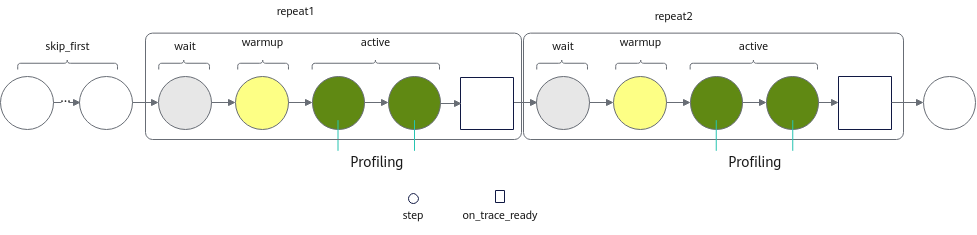
A code example of the configuration:
1 2 3 4 5 6 7 8 9 10 11 12 13 14 15 16 17 | with torch_npu.profiler.profile( activities=[ torch_npu.profiler.ProfilerActivity.CPU, torch_npu.profiler.ProfilerActivity.NPU, ], schedule=torch_npu.profiler.schedule( wait=1, # Waiting phase. One step is skipped. warmup=1, # Warm-up phase. One step is skipped. active=2, # Record the activity data of two steps and call on_trace_ready. repeat=2, # Repeat the wait+warmup+active process twice. skip_first=1 # Skip one step. ), on_trace_ready=torch_npu.profiler.tensorboard_trace_handler('./result') ) as prof: for _ in range(9): train_one_step() prof.step() # Notify the profiler to finish a step. |
Using dynamic_profile for Dynamic Profiling of Maintenance and Test Logs
1 2 3 4 5 6 7 8 | profiler_config_path/ ├── log │ ├── dp_ubuntu_xxxxxx_rank_*.log │ ├── dp_ubuntu_xxxxxx_rank_*.log.1 │ ├── monitor_dp_ubuntu_xxxxxx_rank_*.log │ ├── monitor_dp_ubuntu_xxxxxx_rank_*.log.1 ├── profiler_config.json └── shm |
- dp_ubuntu_xxxxxx.log: Execution log of dynamic_profile, which records all actions (INFO), warnings (WARNING), and errors (ERROR) during dynamic profiling. File naming format: dp_{Operating system}_{AI task process ID}_{Rank_ID}.log
When an AI task is started, each Rank will initiate an AI task process. The dynamic_profile generates log files for each AI task process based on the process ID of each task.
- dp_ubuntu_xxxxxx.log.1: This is a log aging backup file. The storage limit for the dp_ubuntu_xxxxxx.log file is 200 KB. Once the limit is reached, the earliest log entries are moved to dp_ubuntu_xxxxxx.log.1. The storage limit for the dp_ubuntu_xxxxxx.log.1 file is also 200 KB, and once the limit is reached, the earliest log entries are deleted through aging.
- monitor_dp_ubuntu_xxxxxx.log: This is the log for the profiler_config.json file modifications. After dynamic_profile is enabled for dynamic profiling, it records the modification time of the profiler_config.json file, whether the modifications take effect, and the end of the dynamic_profile process in real time. An example is shown below:
1 2 3
2024-08-21 15:51:46,392 [INFO] [2127856] _dynamic_profiler_monitor.py: Dynamic profiler process load json success
2024-08-21 15:51:58,406 [INFO] [2127856] _dynamic_profiler_monitor.py: Dynamic profiler process load json success
2024-08-21 15:58:16,795 [INFO] [2127856] _dynamic_profiler_monitor.py: Dynamic profiler process done
File naming format: monitor_dp_{Operating system}_{monitor process ID}_{Rank_ID}.log
- monitor_dp_ubuntu_xxxxxx.log.1: This is a log aging backup file. The storage limit for the monitor_dp_ubuntu_xxxxxx.log file is 200 KB. Once the limit is reached, the earliest log entries are moved to monitor_dp_ubuntu_xxxxxx.log.1. The storage limit for the monitor_dp_ubuntu_xxxxxx.log.1 file is also 200 KB, and once the limit is reached, the earliest log entries are deleted through aging.
- shm directory: To support Python 3.7, dynamic_profile will generate the shm directory in the environment. A binary file (DynamicProfileNpuShm+Timestamp) is created in this directory to map shared memory. The file will be automatically cleaned up when the program ends normally. However, when the program is terminated using pkill, it cannot release resources due to the abnormal termination, and you need to manually clean up this file. Otherwise, if dynamic_profile is started again within a short period of time (< 1 hour) using the same configuration path, dynamic_profile will fail. For Python 3.8 or later, the binary file (DynamicProfileNpuShm+Timestamp) is stored in the /dev/shm directory. When the program is terminated using pkill, the file still needs to be manually cleaned up.