Applicable Products
Product |
Supported |
|---|---|
√ |
|
√ |
|
√ |
|
x |
|
√ |
|
√ |
Function
The msprof communication profile data parsing function is mainly used to collect statistics on communication-related information, such as the segment-based time consumption, copy information, and bandwidth, for communication data analysis. Communication data exists only in multi-device, multi-node, or cluster scenarios.
Precautions
- Complete the operations in Before You Start first.
- Run the msprof command to parse and export the PROF_XXX directory and disable data clearance mode. The following is a command example:
msprof --export=on --output=/home/xxx/profiler_data/PROF_XXX --clear=off
- Direct parsing on the device is not supported for the products below. You must copy the generated PROF_XXX directory to an environment where the Toolkit package is installed.
Ascend RC scenarios ofAtlas 200I/500 A2 inference products
Command Format
msprof CLI:
msprof --analyze=on [--type=<type>] [--rule=communication] --output=<dir> [--clear=on]
msprof.py script:
python3 msprof.py analyze [--type <type>] --rule communication -dir <dir> [--clear]
Command-line Options
Option |
Description |
Optional/Required |
|---|---|---|
--analyze |
Profile data file to be analyzed, either on or off (default).
|
Required |
--type |
Format of the profile data parsing result file. That is, you can choose the format of the result file generated after the profile data collected by the msprof command is automatically parsed. The available formats include:
The default value is text. |
Optional |
--rule |
Analysis rule. Possible values are as follows:
You can set either or both of the two values. If you set both of them, use a comma (,) to separate the values, for example, :--rule=communication,communication_matrix. By default, they are both set. |
Optional |
--output |
Directory for storing the profile data file. The value must be PROF_XXX, for example, /home/HwHiAiUser/profiler_data/PROF_XXX. The path cannot contain the following characters: "\n", "\\n", "\f", "\\f", "\r", "\\r", "\b", "\\b", "\t", "\\t", "\v", "\\v", "\u007F", "\\u007F", "\"", "\\\"", "'", "\'", "\\", "\\\\", "%", "\\%", ">", "\\>", "<", "\\<", "|", "\\|", "&", "\\&", "$", "\\$", ";", "\\;", "`", "\\`". |
Required |
--clear |
Data clearance mode. After this option is enabled, the sqlite directory in PROF_XXX is deleted after profile data is exported, so as to save storage space. The value can be on or off (default). |
Optional |
Option |
Description |
Optional/Required |
|---|---|---|
analyze |
Analyze the profile data file. |
Required |
--type |
Format of the profile data parsing result file. That is, you can choose the format of the result file generated after the profile data collected by the msprof.py script is automatically parsed. The available formats include:
The default value is text. |
Optional |
-r or --rule |
Analysis rule. Possible values are as follows:
You can set either or both of the two values. If you set both of them, use a comma (,) to separate the values, for example, :--rule communication,communication_matrix. |
Required |
-dir, or --collection-dir |
Directory for storing the profile data file. The value must be PROF_XXX, for example, /home/profiler_data/PROF_XXX. The path cannot contain the following characters: "\n", "\\n", "\f", "\\f", "\r", "\\r", "\b", "\\b", "\t", "\\t", "\v", "\\v", "\u007F", "\\u007F", "\"", "\\\"", "'", "\'", "\\", "\\\\", "%", "\\%", ">", "\\>", "<", "\\<", "|", "\\|", "&", "\\&", "$", "\\$", ";", "\\;", "`", "\\`". |
Required |
--clear |
Data clearance mode. After this option is enabled, the sqlite directory in PROF_XXX is deleted after profile data is exported, so as to save storage space. When this parameter is configured, the data clearance mode is enabled. This parameter is not configured by default. |
Optional |
Example (msprof CLI)
Specify the /home/profiler_data/PROF_XXX directory as the profile data file directory and enable the profile data file analysis option.
msprof --analyze=on --output=/home/profiler_data/PROF_XXX
Example (msprof.py Script)
- Log in to the development environment as the Toolkit running user.
- Switch to the directory where the msprof.py script is located.
${INSTALL_DIR}/tools/profiler/profiler_tool/analysis/msprof. Replace ${INSTALL_DIR} with the CANN component directory. For example, if the installation is performed by the root user, the default file storage path is /usr/local/Ascend/cann.
- Specify the /home/profiler_data/PROF_XXX directory as the profile data file directory and run the following command:
python3 msprof.py analyze --rule communication -dir /home/profiler_data/PROF_XXX
Output File Description
- --type=text or --type=db, and --rule=communicationFigure 1 CommAnalyzerTime

Table 3 CommAnalyzerTime Field
Description
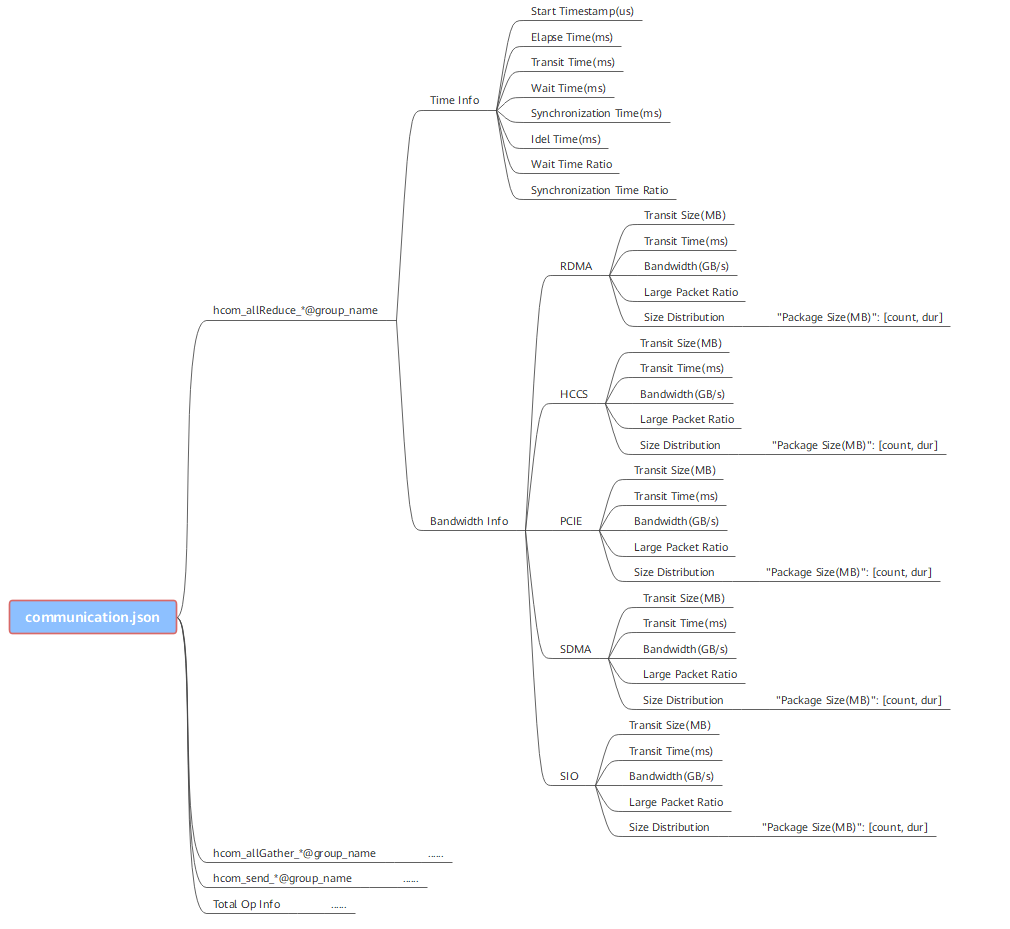
hccl_op_name
Communication operator name.
group_name
Group of communication operators.
start_timestamp
Communication start timestamp.
elapse_time
Total operator communication duration, in milliseconds.
transit_time
Communication duration, in milliseconds. If the communication duration is too long, a link may be faulty.
wait_time
Waiting duration, in milliseconds. Before establishing communication between nodes, ensure that the synchronization between the two nodes is complete.
synchronization_time
Synchronization duration, in milliseconds. It is the duration required for synchronization between nodes.
idle_time
Idle time, in ms. Idle time (idle_time) = Total operator communication duration (elapse_time) – Communication duration (transit_time) – Waiting duration (wait_time)
Figure 2 CommAnalyzerBandwidth
Table 4 CommAnalyzerBandwidth Field
Description
hccl_op_name
Communication operator name.
group_name
Group of communication operators.
transport_type
Communication transmission type, including LOCAL, SDMA, RDMA, PCIE, SIO, and HCCS.
transit_size
Communication data volume, in MB.
transit_time
Communication duration, in milliseconds. If the communication duration is too long, a link may be faulty.
bandwidth
Communication bandwidth, in GB/s.
large_packet_ratio
Ratio of large communication data packets.
package_size
Size of a communication data packet transmitted at a time, in MB.
count
Number of communication transmission times.
total_duration
Total duration of data transmission, in ms.
- --type=text or --type=db, and --rule=communication_matrixFigure 3 CommAnalyzerMatrix

Table 5 CommAnalyzerMatrix Field
Description
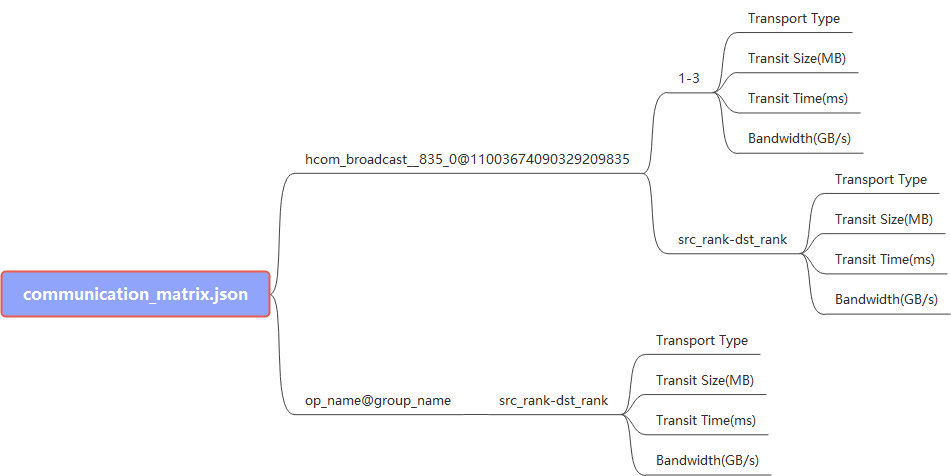
hccl_op_name
Communication operator name.
group_name
Group of communication operators.
src_rank
Rank of the communication source.
dst_rank
Rank of the communication destination.
transport_type
Communication transmission type, including LOCAL, SDMA, RDMA, PCIE, HCCS , and SIO.
transit_size
Communication data volume, in MB.
transit_time
Communication duration, in milliseconds. If the communication duration is too long, a link may be faulty.
bandwidth
Communication bandwidth, in GB/s.
- --type=text and --rule=communication
- --type=text and --rule=communication_matrix