Applicable Products
|
Product |
Supported (√/x) |
|---|---|
|
|
√ |
|
|
√ |
|
|
√ |
|
|
√ |
|
|
√ |
|
|
√ |
Description
Performs initialization.
Prototype
- C Prototype
1aclError aclInit(const char *configPath)
- Python Function
1ret = acl.init(config_path)
Parameters
|
Parameter |
Description |
|---|---|
|
config_path |
Path of the configuration file, including the file name. The configuration file is in JSON format. A JSON file allows up to 10 levels of curly brackets and square brackets, respectively. To use the default configurations, directly call the acl.init interface without passing any parameter or set the configuration file to an empty JSON string (that is, only {} exists in the configuration file). The configuration file is in JSON format. The following configurations are supported:
NOTE:
Dump configuration and profiling configuration should not be both set. The dump operation could affect the system performance, resulting in inaccurate profile data collected by Profiling. |
Return Values
|
Return Value |
Description |
|---|---|
|
ret |
Int, error code. 0 on success; else, failure. |
Restrictions
-
acl.init must be called before app development using pyacl APIs. Otherwise, an error may occur during the initialization of internal system resources, causing other service exceptions.
- aclInit can be called multiple times in a process, but the aclFinalize or aclFinalizeReference API must be called for deinitialization.
- The configuration must be consistent each time aclInit is called. Otherwise, only the configuration of the first call is valid. Calling the aclInit API again may cause errors.
- To be compatible with earlier versions, if the aclInit API is called repeatedly, the error code ACL_ERROR_REPEAT_INITIALIZE will be returned. You can ignore this error and continue to process services.
- The aclInit and aclFinalize APIs can be called repeatedly for initialization and deinitialization, respectively. Only sequential calls are available for the two APIs.
aclInit --> Service processing --> aclFinalize --> aclInit --> Service processing --> aclFinalize
After you call aclInit multiple times, you only need to call aclFinalize once to perform deinitialization. The aclInit reference count will be reset to 0.
- If the aclInit and aclFinalizeReference APIs are called for initialization and deinitialization, respectively, the two APIs need to be called in pairs.
aclFinalizeReference involves reference counting. Each time aclInit is called, the reference count is incremented by 1. Each time aclFinalizeReference is called, the reference count decreases by 1. Deinitialization is performed only when the reference count decreases to 0.
Repeated initialization and deinitialization are supported. The APIs can be called in sequence or concurrently. The API call sequence is as follows:

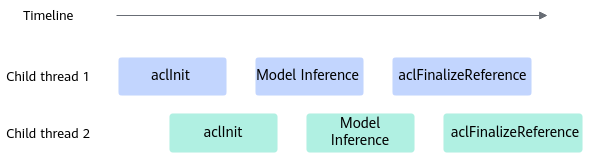
Example of Overflow/Underflow Operator Dump Configuration
{
    "dump":{
        "dump_path":"output",
        "dump_debug":"on"
    }
}
- If dump_debug is not set or set to off, the overflow/underflow operator configuration is disabled.
- If the overflow/underflow operator configuration is enabled, dump_path must be set to specify the path for storing exported dump files.
After obtaining the exported data files, parse the files by referring to Collecting and Analyzing Data of Overflow/Underflow Operators in Accuracy Analyzer.
dump_path can be set to an absolute path or a relative path.- An absolute path starts with a slash (/), for example, /home.
- A relative path starts with a directory name, for example, output.
- This function cannot be enabled when model or single-operator dump configuration is enabled. Otherwise, an error is returned.
- Only overflow/underflow data of AI Core operators can be collected.
Dump Watch Configuration for Operators
{
    "dump":{
        "dump_list":[
            {
                "layer":["A", "B"],
                "watcher_nodes":["C", "D"]
            }
        ],
        "dump_path":"/home/",
        "dump_mode":"output",
        "dump_level":"op",
        "dump_scene":"watcher"
    }
}
The details are as follows:
- If the operator dump watch mode is enabled, the overflow/underflow operator dump (by configuring the dump_debug parameter) or the single-operator model dump (by configuring the dump_op_switch parameter) cannot be enabled. Otherwise, an error will be reported. This mode does not take effect in the single-operator API dump scenario.
- In dump_list, the layer parameter is used to configure the names of the operators that may overwrite the memory of other operators, and the watcher_nodes parameter is used to configure the names of the operators with accuracy issues possibly due to output memory being overwritten by other operators.
- If layer is specified, the output of the operators configured for watcher_nodes is dumped after all operators that support dump in the model are executed.
- If any operator in layer and watcher_nodes is not in a static graph or static subgraph, the configuration does not take effect.
- If an operator is in both layer and watcher_nodes or an operator in layer is a collective communication operator (the operator type starts with Hcom, for example, HcomAllReduce), only the dump files of operators in watcher_nodes will be exported.
- For a fused operator, use its name after fusion when you add it to watcher_nodes. Otherwise, dump files cannot be exported.
- Currently, model_name cannot be configured in dump_list.
- If the operator dump watch mode is enabled, dump_path, which is the path for storing the exported dump file, must be configured.
The exported dump files cannot be viewed using a text tool. To view the content of a dump file, convert the dump file to a NumPy file and then view the NumPy file using Python. For details about the conversion procedure, see Viewing Dump Files in Accuracy Analyzer.
dump_path can be set to an absolute path or a relative path.- An absolute path starts with a slash (/), for example, /home.
- A relative path starts with a directory name, for example, output.
- dump_mode is used to specify the data of the operators configured for watcher_nodes to be exported. Currently, only output can be configured.
- dump_level is used to set the level of dump data. The value can be:
- op: dumps data at the operator level.
- kernel: dumps data at the kernel level.
- all (default): dumps data at both the op level and the kernel level.
If the default value is used, there are a large number of dump files, for example, dump files starting with aclnn. If you have requirements on the dump performance or the memory resources are limited, you can set this parameter to the op level to improve the dump performance and reduce the number of dump files.
Note: An operator represents a computational logic (such as addition, subtraction, multiplication, and division). A kernel is the implementation that executes this computational logic, and requires allocation of specific computing devices to complete computation.
Dump configuration of the operator kernel debugging information
Configure the dump_kernel_data parameter to enable the operator kernel debugging information dump function. The following is an example of the configuration file:
{
    "dump":{
        "dump_kernel_data":"printf,assert",
        "dump_path":"/home/"
    }
}
The details are as follows:
- dump_kernel_data: specifies the type of data to be exported. Multiple types can be configured and separated by commas (,). If this field is not configured but the model dump configuration and single-operator dump configuration are enabled, the debugging information is exported based on all by default.
Available environment variables are as follows:
- all: Exports the output data of all the following types:
- printf: exports the output data debugged by AscendC::printf.
- tensor: exports the output data debugged by AscendC::DumpTensor.
- assert: exports the output data debugged by assert/ascendc_assert.
- timestamp: exports the output data debugged by AscendC::PrintTimeStamp.
- dump_path: path for storing the exported dump file, which must be configured when the operator kernel debugging information dump function is enabled. The path can be an absolute path or a relative path.
The priorities of the dump file storage paths are as follows: ASCEND_DUMP_PATH environment variable > ASCEND_WORK_PATH environment variable > dump_path in the configuration file. For details about the environment variables, see Environment Variables.
The content of the exported dump file cannot be directly viewed using a text tool. To view the content, use the show_kernel_debug_data tool to parse the debugging information into a readable format. For details about how to use the tool, see show_kernel_debug_data in Ascend C Operator Development.
Example (Default Device Configuration)
Set the device ID in default_device, which can be 0 or a decimal positive integer. You can call aclrtGetDeviceCount to obtain the number of available devices. The value range of the device ID is [0, (Number of available devices – 1)].
The following gives a configuration example:
{
    "defaultDevice":{
        "default_device":"0"
    }
}
Example of AI Core Stack Size Configuration
Use aicore_stack_size to set the stack size, in bytes. The value must meet the following requirements:
- The value of aicore_stack_size must be an integer multiple of 16 KB. Otherwise, the value will be rounded up to meet this requirement.
- The minimum value of aicore_stack_size is 32 KB. If the input value is smaller than that, the default value 32 KB will be used.
- The maximum value of aicore_stack_size for each product is as follows:
For the
Ascend 950PR /Ascend 950DT , the maximum value of aicore_stack_size is 128 KB.For the
Atlas A3 training products /Atlas A3 inference products , the maximum value of aicore_stack_size is 192 KB.For the
Atlas A2 training products /Atlas A2 inference products , the maximum value of aicore_stack_size is 192 KB.For the
Atlas 200I/500 A2 inference products , the maximum value of aicore_stack_size is 7,680 KB.
The following gives a configuration example:
{
    "StackSize":{
        "aicore_stack_size":32768
    }
}
Configuration example of the SIMT operator stack size
simt_stack_size specifies the stack size of each thread of the SIMT operator. The unit is byte.
The simt_divergence_stack_size parameter is used to set the size of the branch (Divergence) stack space of the SIMT operator. The unit is byte.
The values of simt_stack_size and simt_divergence_stack_size must be an integer multiple of 128. If the input value is not a multiple of 128, the API automatically rounds up the value to ensure that it is a multiple of 128.
The following gives a configuration example:
{
  "StackSize": {
    "simt_stack_size": 1024,
    "simt_divergence_stack_size": 512
  }
}
Example of configuring the size of the SIMT Printf maintenance and test space
The simt_printf_fifo_size parameter is used to set the size of the Printf maintenance and test space of the SIMT operator. The unit is byte. The value must be an integer multiple of 8. If the input value is not an integer multiple of 8, the API automatically rounds up the value to ensure that it is an integer multiple of 8.
The default value of simt_printf_fifo_size is 2 MB. The minimum value is 1 MB and the maximum value is 64 MB.
The following gives a configuration example:
{
  "simt_printf_fifo_size": 1048576
}
Example of configuring the size of the SIMD Printf maintenance and test space
The simd_printf_fifo_size_per_core parameter is used to set the size of the Printf maintenance and test space of the SIMD operator. The unit is byte. The value must be an integer multiple of 8. If the input value is not an integer multiple of 8, the API automatically rounds up the value to ensure that it is an integer multiple of 8.
The default value of simd_printf_fifo_size_per_core is 32 KB. The minimum value is 1 KB and the maximum value is 64 MB.
The following gives a configuration example:
{
  "simd_printf_fifo_size_per_core": 1048576
}
Reference
For the API call example, see Initialization and Deinitialization.
More flexible APIs are provided for enabling dump or profiling. Unlike aclInit, these APIs can be called repeatedly in a process, allowing varied dump/profiling configurations with each call.
- Obtains dump data: Function: init_dump, Function: set_dump, Function: finalize_dump If you do not need to write the dump data to a file, obtain it by using the callback function. For details, see Function: dump_reg_callback.
- Obtains profile data: Profile Data Collection